Lab 8: Resume, recover and tear down
All phases 25 min Intermediate
Overview
Real runs stop: a gate blocks, a terminal closes, a platform has an incident. This lab shows how to continue without redoing finished work, how to keep the evidence in your repository, what the whole build cost, and how to remove what you created.
Learning objectives
By the end of this lab, you will be able to:
- Stop a run and resume it from
state.jsonwithout redoing finished work. - Reset a single task to
pendingand re-run only that task. - Match a failure to a recovery pattern.
- Snapshot
state.json,plan.md,tasks.md,changes.mdanddecisions.mdtodocs/run/<run-id>/. - Read the cost of a whole build and plan a cheaper one.
- Tear down what the labs created (deployments, practice repositories, local folders) without touching the reference repositories.
Cost and credits
Resuming is cheaper than restarting
A resume run in the Focus Garden sample took 19 minutes and about 392 credits, against about 2,097 credits for its first run. The whole Pinch build cost about 1,730 credits (table in Step 6). See Lab 0 for the rules that keep a run cheap.
Steps
Teardown touches your own repository only
Steps 7 and 8 delete things. Run them only against your own practice repository, and read each command before you press Enter. Never run any teardown command against ai-sdlc-labs-pinch, ai-team-sdlc, ai-sdlc-labs or the Focus Garden sample. If you do not have a practice repository, read these steps and skip the commands.
Step 1: Read the run state
state.json is the canonical record of a run. plan.md and tasks.md are projections made from it, and when they disagree, state.json wins. Read it from your own tracking store, or from the snapshot in a read-only clone of the reference repository.
git clone https://github.com/devopsabcs-engineering/ai-sdlc-labs-pinch.git "$HOME\src\pinch-reference"
Set-Location -LiteralPath "$HOME\src\pinch-reference"
git switch --detach lab-08-end
$StatePath = 'docs\run\2026-10-05-pinch\state.json'   # your own run: .copilot-tracking\<run-id>\state.json
$state = Get-Content $StatePath -Raw | ConvertFrom-Json
$state.status; $state.currentPhase
$state.tasks | Select-Object id, owner, status, retries | Format-Table -AutoSize
Expected result
status is done and currentPhase is deploy. The table lists T-001 to T-014, all done. Look at retries: T-012 (critic review) shows 1 and T-013 (security) shows 2. T-011 shows 0 because it was reset after a human fix (Step 3).
Do not push from this clone. It is only for reading.
Step 2: Stop a run and resume it
Stop a run with Ctrl+C in the terminal where copilot runs. State is written to disk as tasks complete, so little is lost. At the end of each run the CLI prints a session id. Two ways to continue:
# 1. Continue the same CLI session
copilot --resume=<session-id>

# 2. Start a new session and resume by run id
copilot -p "Use the ait-sdlc-orchestrate skill. Resume run <run-id>. Run ONLY the next pending task. Do not push, do not deploy." --allow-all-tools --no-ask-user
The orchestrator follows these rules when it resumes:
- It reads
state.json, then reconcilesplan.md. - A task left
in_progressafter a crash counts as not done and is run again. - It continues at the first task that is
pendingorin_progressand whose dependencies are alldone. donetasks are never redone.- It resumes only when you give an existing run id. Without one, it creates a new run id.
Bounded runs resume well
Ask for one phase or a few tasks per prompt, and add --share evidence\<name>.md --log-dir evidence\logs so each run leaves a record. The Focus Garden run was resumed from state.json across 4 invocations.
Step 3: Recover a blocked task
A failed gate is retried with the failure context and retries goes up. After 2 retries, the task becomes blocked, and the run stops until a human decides. In Pinch, T-011 (QA) was blocked because the agent could not install Prettier: the corporate registry refused the package with EALLOWREMOTE.
The recovery had four parts:
- A human fixed the root cause (commit
ddfd6fe: Prettier added topackage.jsonand the lockfile, and aformat:checkscript). - The decision was recorded in
decisions.md. - T-011 was reset to
pendingwithretries0, so it got a fresh budget. - The run was resumed by naming the run id.
copilot -p "Use the ait-sdlc-orchestrate skill. Resume run <run-id>. I fixed the cause of the T-011 failure. Record that decision in decisions.md, reset T-011 to pending with retries 0 and re-run only T-011. Do not push, do not deploy." --allow-all-tools --no-ask-user
Do not weaken a gate to unblock a task
When T-013 (security) stayed blocked because of a development-only advisory, the agent refused the "fix" that would have downgraded Vite and Vitest. A person recorded a waiver in decisions.md, with a re-check trigger. Only humans waive gates.
Step 4: Match the failure to a recovery pattern
| What happened | What the run does | What you do |
|---|---|---|
A task is blocked after 2 retries (Pinch T-011, T-013) |
The run stops | Fix the root cause or record a human decision, reset the task to pending with retries 0, resume by run id |
The terminal closed or you pressed Ctrl+C |
A task left in_progress counts as not done |
copilot --resume=<session-id>, or resume by run id |
| A gate cannot run (Lab 2: the Playwright MCP was missing) | The task is blocked, not skipped |
Give the gate its tool, or let the agent use an existing one, then resume |
| A workflow is cancelled during a platform incident (Focus Garden) | Nothing was deployed | Dispatch the workflow again when the platform recovers |
| The merged tree differs from the approved tree | Deploy must stop | Go back to sign-off |
| You want to deploy faster | Not allowed | Never bypass the governed workflow, never force-push a gh-pages branch |
Step 5: Snapshot the run record into the repository
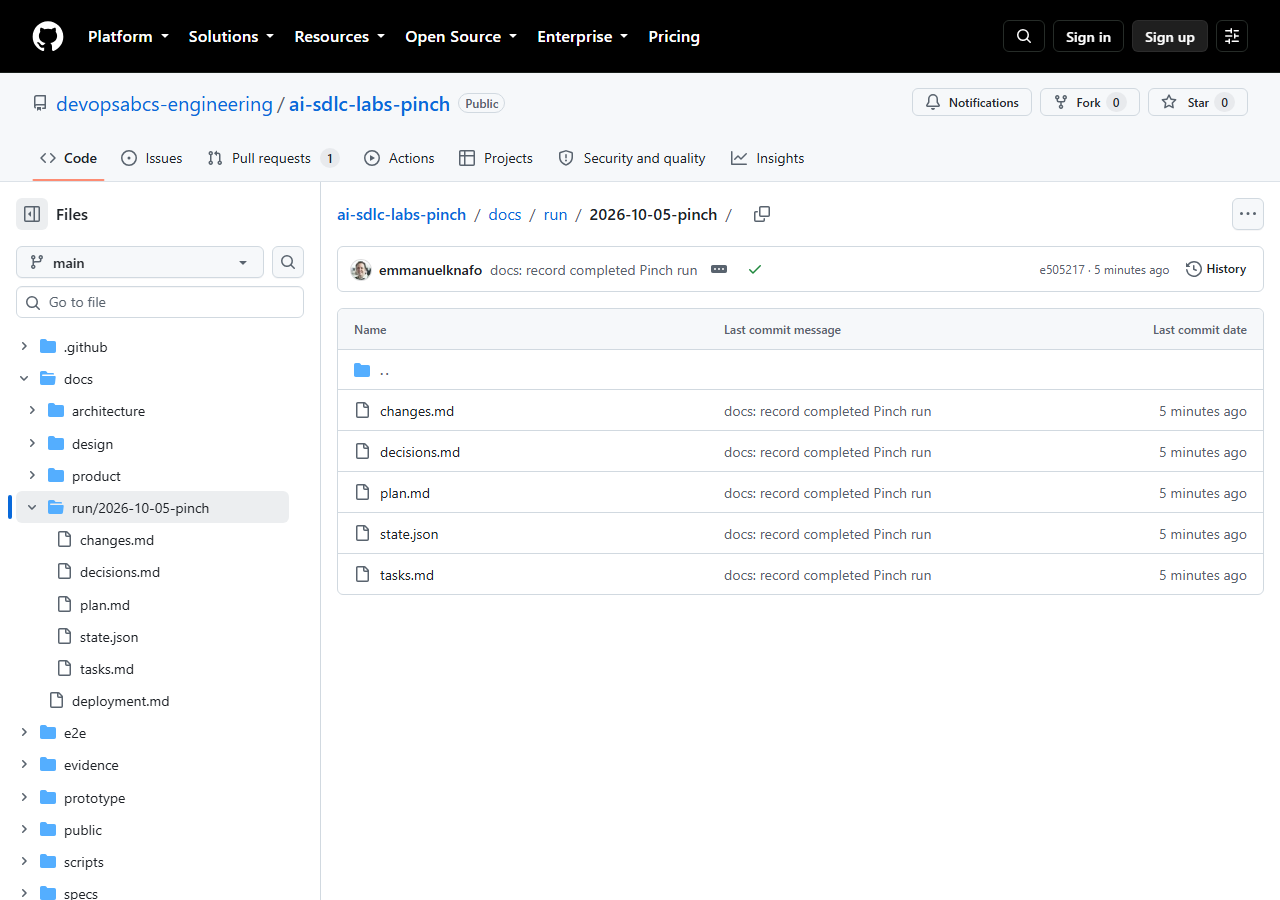
.copilot-tracking/ is git-ignored, so the run evidence stays on your machine unless you copy it. Snapshot the five files under docs/run/<run-id>/ and commit them.
Set-Location -LiteralPath "$HOME\src\ai-sdlc-practice"   # your own repository
$RunId = '<run-id>'
$dest = "docs\run\$RunId"
New-Item -ItemType Directory -Force $dest | Out-Null
foreach ($f in 'state.json','plan.md','tasks.md','changes.md','decisions.md') { Copy-Item ".copilot-tracking\$RunId\$f" $dest }
git add docs/run
git commit -m "docs: record completed run"
Expected result
git show --stat HEAD lists the five files under docs/run/<run-id>/.
Step 6: Add up the cost of the whole build
These are the real numbers from the recorded Pinch run.
| Phase | Run | Credits | Time |
|---|---|---|---|
| Lab 2: design and prototype | lab-02-design-prototype |
284.39 | about 15 to 25 min (the reported 11 h 12 min is a timer artifact) |
| Lab 3: requirements and architecture | lab-03-requirements-architecture |
88.03 | about 3.5 min |
| Lab 4: build, slices 1 | lab-04a-build-slices-1 |
394.17 | 28 min 39 s |
| Lab 4: build, slices 2 | lab-04b-build-slices-2 |
368.57 | 19 min 23 s |
| Lab 5: QA, critic, security | lab-05-qa-critic-security |
79.25 | not recorded |
| Lab 5: retry | lab-05b-qa-critic-security-retry |
396.72 | 32 min 54 s |
| Labs 6 and 7: sign-off and deploy | lab-06-07-signoff-deploy |
117.52 | 8 min 52 s |
| Total | 1,728.65 |
The bootstrap and the brief are small and not itemized. Focus Garden, which had a changes-requested loop and no bounded runs, cost about 3,300 credits (2,097 + 392 + 747 + 92).
What lowers the bill
Bound each run to one phase, stop at gates, keep the scope small (3 or 4 features), and fix a blocked task before you resume.
Step 7: Disable Pages and clean the branches
Only for your own repository. This takes your live site offline.
$Repo = '<owner>/<repo>'
gh api --method DELETE "repos/$Repo/pages"
git switch main
git pull
git branch -d feature/pinch
git push origin --delete feature/pinch
git branch -d refuses to delete a branch that is not merged, which is the safety you want: delete merged branches only. Keep your tags: they are your checkpoints.
Step 8: Delete the practice repository and local files
Do this only when you are finished with the practice repository. Back up what you want to keep first.
gh repo view $Repo --json nameWithOwner,url
Copy-Item "$HOME\src\ai-sdlc-practice\.copilot-tracking" "$HOME\evidence-backup" -Recurse   # optional
gh repo delete $Repo --yes
Set-Location -LiteralPath $HOME
Remove-Item -LiteralPath "$HOME\src\ai-sdlc-practice" -Recurse -Force
copilot plugin uninstall ai-team-sdlc
Check the name before you delete
gh repo delete --yes does not ask. Read the output of gh repo view first: it must be your own practice repository. If gh repo delete reports a missing scope, run gh auth refresh -h github.com -s delete_repo, then try again.
You can also remove the marketplace entry if you no longer need it (see copilot plugin marketplace --help). Keep .copilot-tracking if you want to keep the evidence.
Final checklist
- I can read
state.jsonand explainstatus,retriesandsignoff. - I know two ways to resume a run, and that
donetasks are never redone. - I can reset one blocked task and re-run only that task.
- The run record is committed under
docs/run/<run-id>/. - I know what my own build cost, and I know three ways to reduce it.
- Pages is disabled and merged branches are removed in my practice repository, or I deleted it.
- I never ran a teardown command against a reference repository.
Checkpoint
Check your work
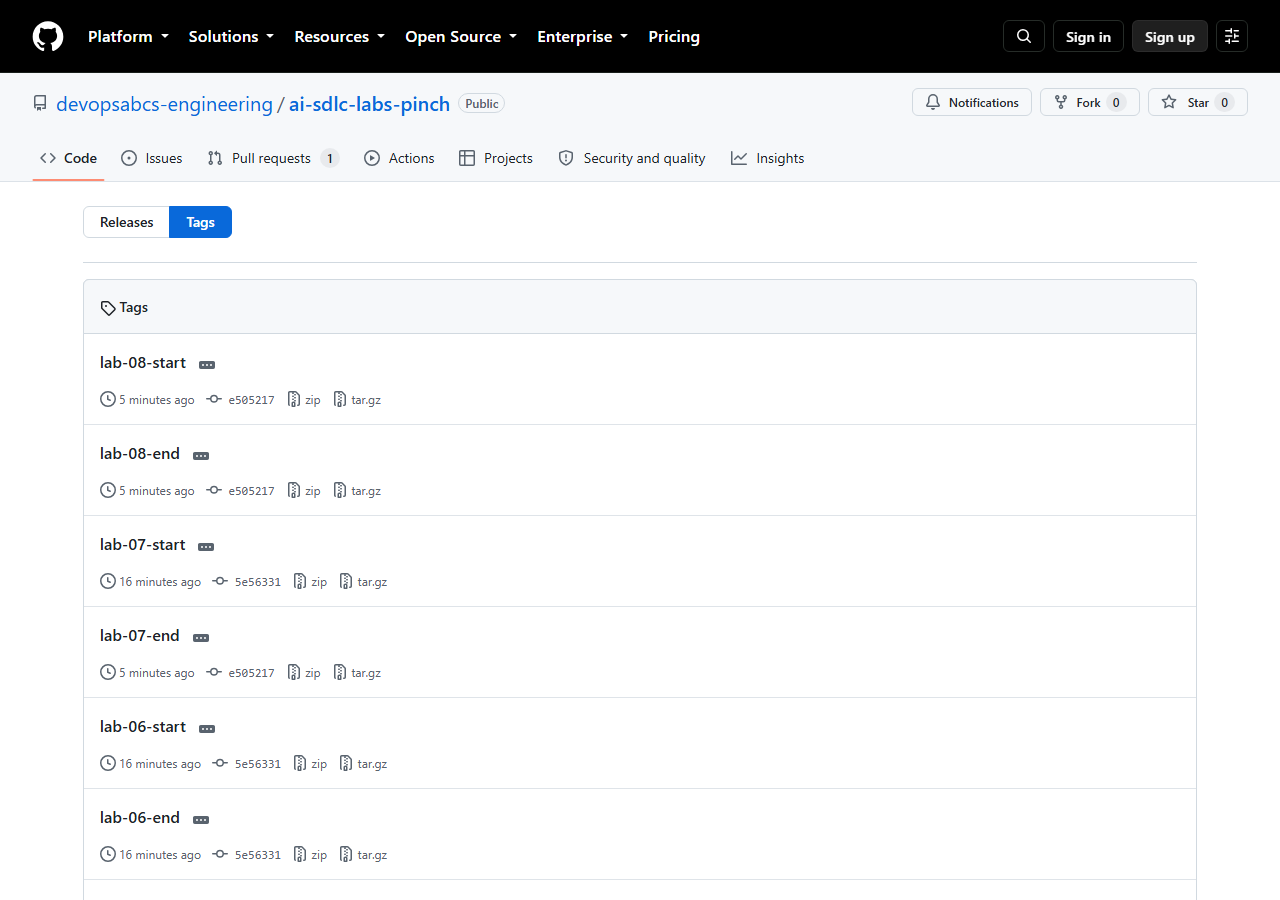
The tags lab-08-start and lab-08-end point to the same commit, e505217: this lab changes no code. The run snapshot is committed under docs/run/2026-10-05-pinch/, and the cleanup concerns your own practice repository.
Bring your own idea
- Name each run (
lab-NN-...), bound it to one phase, and add--shareand--log-dirso you can compare cost per run. - Keep your own table like the one in Step 6. After your second run you will see which phase costs most.
- Snapshot the run record in every checkpoint commit, not only at the end.
- Start with 3 or 4 features. A bigger scope multiplies slices, gates and retries.
- Write down the root cause and the decision each time you unblock a task.
What went wrong in the recorded runs
- Pinch T-011 and T-013 were blocked. T-011 (QA) failed because the registry policy refused a package. T-013 (security) failed on a development-only advisory that had no fixed version. Both stopped after two attempts, as designed.
- Pinch T-012 (critic review) failed once with two blocking findings. Two fix commits followed, and the re-review passed (T-012 shows
retries1 in the final state). - One test hung once on cold start (a
beforeEachtimeout). The unchanged rerun passed in 7.4 s. - The scribe sub-agent could not consolidate the inbox files because it has no read tool, so the orchestrator did it. This is a known limit of the plugin.
- Focus Garden was interrupted by a platform incident. Its first release run was cancelled before any step ran, and a new dispatch fixed it.
Troubleshooting
The orchestrator starts a new run instead of resuming
It resumes only when you give an existing run id. Name it in the prompt: Resume run <run-id>. The folder name under .copilot-tracking is the run id.
I lost the session id
Use the second way: start a new session and resume by run id. The state is in .copilot-tracking/<run-id>/state.json, not in the chat.
The tracking folder is missing after a fresh clone
.copilot-tracking/ is git-ignored and only exists on the machine where the run happened. The docs/run/<run-id>/ snapshot is the committed record of the run.
gh repo delete or the Pages call fails
For gh repo delete, add the scope with gh auth refresh -h github.com -s delete_repo. For the Pages call, check that Pages is enabled and that you have admin rights on the repository. Check $Repo with gh repo view $Repo.
More help: Troubleshooting.
Knowledge check
Which file wins when plan.md and state.json disagree?
state.json. plan.md and tasks.md are projections that the orchestrator regenerates from it.
A task is blocked. What are the two ways forward?
Fix the root cause and reset the task to pending with retries 0, or have a human record a waiver in decisions.md. An agent never waives a gate on its own.
Why does git branch -d suit the cleanup?
It refuses to delete a branch that is not merged, so you only remove work that is already in main.
Summary
You can read the state of a run, resume it two ways, recover a blocked task without weakening a gate, keep the evidence in docs/run/, read the cost of a whole build (about 1,730 credits for Pinch) and remove your practice resources safely. You have now completed the full lifecycle, from an idea to a deployed and approved app.
Next steps
You have completed the labs. Where to go next:
- Run the lifecycle again on your own idea, with a small scope.
- Read the Focus Garden evidence for a run with a changes-requested loop.
- Explore the plugin repository and contribute.
- Return to the lab map, the glossary or Troubleshooting.