Lab 7: Deploy to production
Deploy 30 min Intermediate
Overview
The deploy phase ships one thing: the exact tree that three people approved. You push it, merge it without squashing, prove that main holds the same tree, publish it through a governed workflow and check the live site.
Learning objectives
By the end of this lab, you will be able to:
- Run the
ait-deployskill only after sign-off is approved, and stop if the code differs from the approved pin. - Push, open a pull request and merge without squash, then prove that
mainhas the approved tree. - Enable GitHub Pages with a GitHub Actions workflow and start it with
governance_approved=true. - Explain and verify the
pre-deploy,smokeandrollback-readygates. - Describe how to roll back to the previous version.
Cost and credits
A deploy run is short and cheap
In the recorded Pinch run, sign-off persistence and deploy together took about 8 minutes 52 seconds and 117.52 AI credits. The GitHub Pages workflow itself ran for about 2 minutes. See Lab 0 for the cost of a full run.
Steps
Use your own repository
Every command below uses the placeholders <owner> and <repo>. Replace them with your own practice repository. Never run these commands against the reference repositories (ai-sdlc-labs-pinch, ai-team-sdlc, the Focus Garden sample): the lab is about deploying your own copy.
Set the variables once in your PowerShell session, from the repository root:
$Repo  = '<owner>/<repo>'
$RunId = '<run-id>'      # the folder name under .copilot-tracking, for example 2026-10-05-pinch
Step 1: Check the approved pin
Deploy ships the approved artifact only. Read the sign-off record, then compare it to what you have checked out.
git switch feature/pinch
$commit  = git rev-parse HEAD
$tree    = git rev-parse 'HEAD^{tree}'
$signoff = (Get-Content ".copilot-tracking\$RunId\state.json" -Raw | ConvertFrom-Json).signoff
$signoff.status
$signoff.artifact
"HEAD commit: $commit"
"HEAD tree:   $tree"
Stop here if signoff.status is not approved, or if the commit or tree differ from signoff.artifact. Any change after approval resets sign-off to pending and sends the run back to Build.
Expected result
status is approved, and the commit and tree match. In the recorded Pinch run the pin was commit 5e56331 and tree 9418e31b7ba315d15592ff1f12096d6f4bb76b31.
Let the agent run the chain
You can also ask for the whole phase in one bounded prompt, from the repository root: copilot -p "Use the ait-deploy skill. Run ONLY the deploy phase for run <run-id>. Stop if HEAD differs from the approved pin." --allow-all-tools --no-ask-user. The steps below are what the agent does, so you can check its work.
Step 2: Run the pre-deploy audit gate
The pre-deploy gate re-checks the production dependencies before anything leaves your machine.
Expected result
No high or critical vulnerability in the production dependencies. Pinch ships no runtime dependencies, so the recorded audit reports 0 vulnerabilities. This is the audit that the Lab 6 waiver relies on.
Step 3: Push the branch
Step 4: Open the pull request
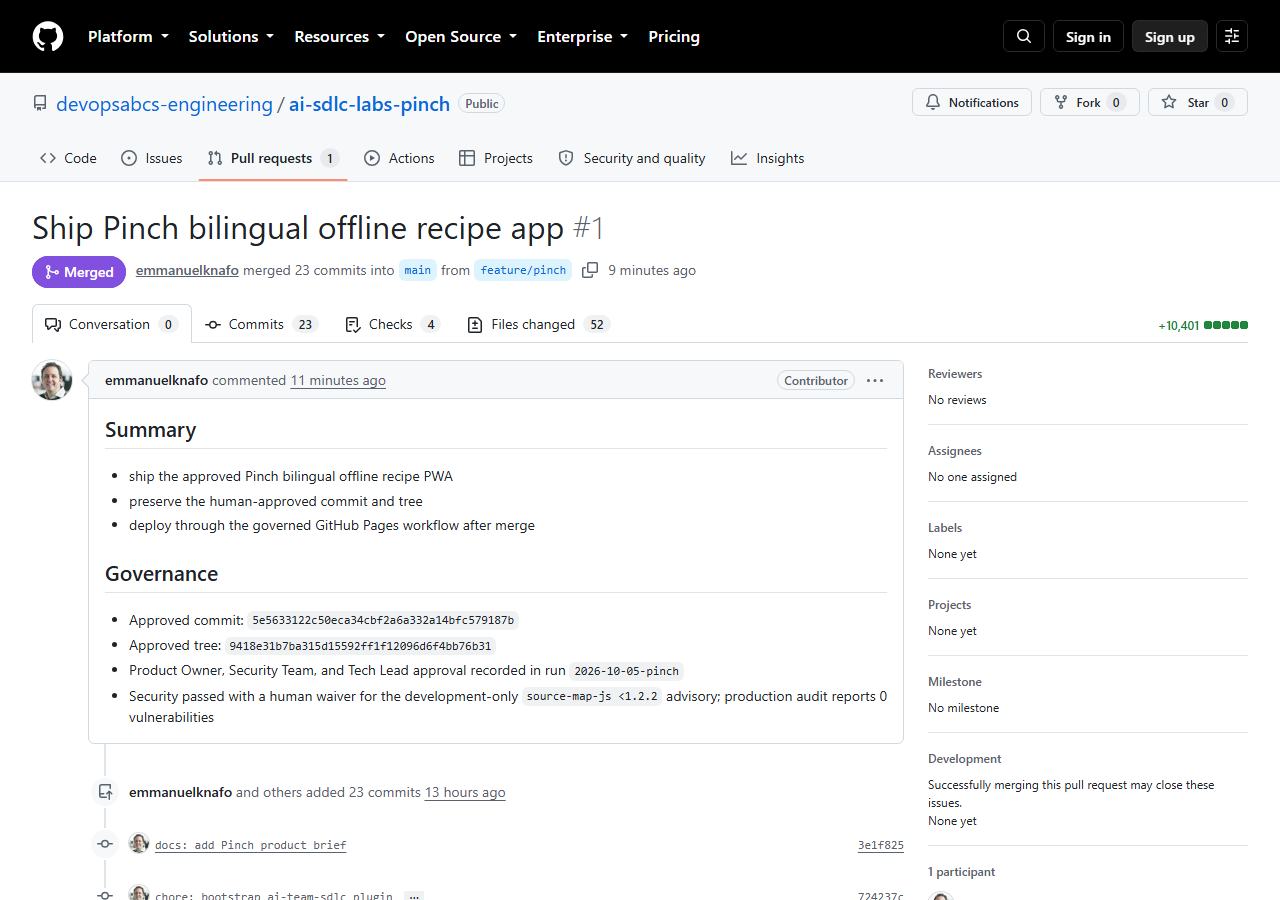
Put the approved commit and tree in the description, so a reviewer can see what is being merged.
gh pr create --repo $Repo --base main --head feature/pinch `
  --title "Ship <your app name>" `
  --body "Approved commit: $commit`nApproved tree: $tree`nApproval recorded in run $RunId."
Step 5: Wait for checks, then merge without squash
Use the number of your own pull request in place of 1. In the reference run the PR checks were CodeQL and the cross-platform tests.
Never squash or rebase here
--merge keeps the approved commit inside the history of main. A squash or a rebase creates new commits, and you can no longer show that the merged code is the approved code.
Step 6: Prove the tree is the approved tree
A merge commit has a new id, so compare the tree, which is the content id.
git fetch origin
$mainTree = git rev-parse 'origin/main^{tree}'
if ($mainTree -eq $tree) { 'Tree equality: OK' } else { throw "main tree $mainTree differs from approved tree $tree" }
Expected result
The command prints Tree equality: OK. In the reference run the merge commit was 50d2714, and its tree was the approved 9418e31....
Step 7: Enable GitHub Pages with a workflow
Pages already enabled?
If the call fails because Pages already exists, open Settings > Pages in your repository and set Source to GitHub Actions. Until the first deploy ends, the site address shows a 404 page: this is normal.
Step 8: Dispatch the governed workflow
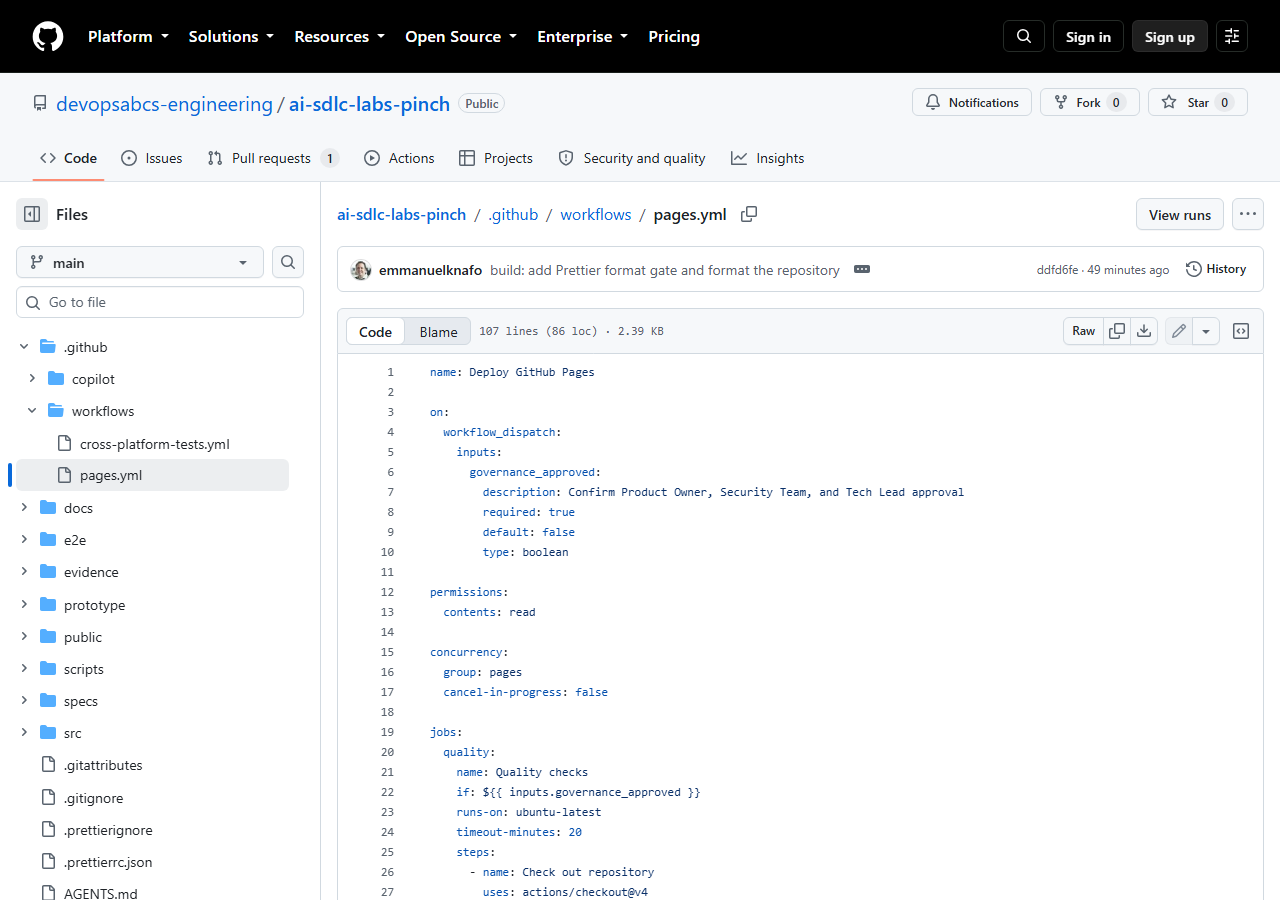
The workflow .github/workflows/pages.yml runs only when a person sets the input to true:
on:
  workflow_dispatch:
    inputs:
      governance_approved:
        description: Confirm Product Owner, Security Team, and Tech Lead approval
        required: true
        default: false
        type: boolean
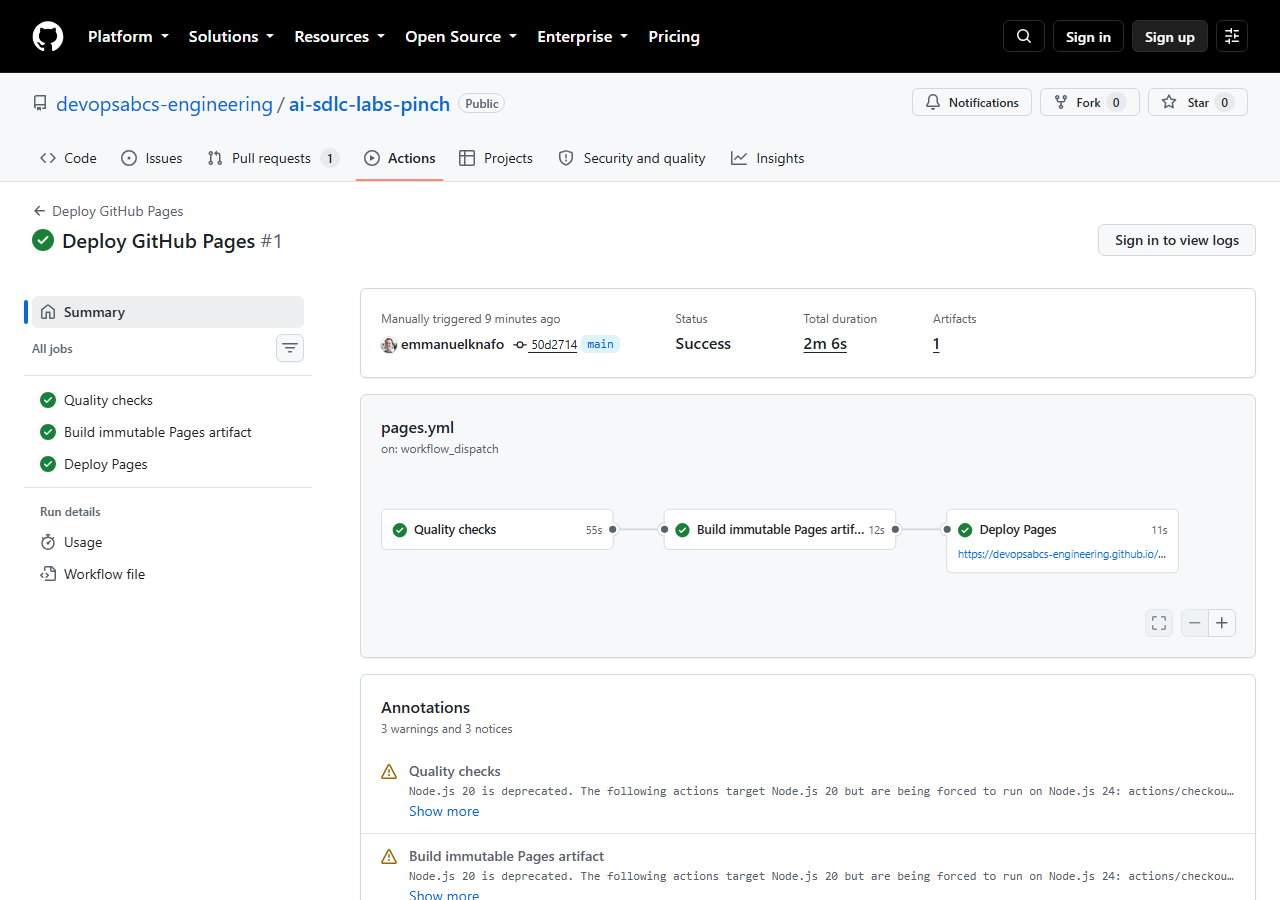
It has three jobs: quality (build, lint, format, unit tests, i18n-parity, portable-os, Playwright, Lighthouse), build-pages-artifact (an immutable artifact built with --base=/ai-sdlc-labs-pinch/) and deploy-pages. Start it from main:
gh workflow run .github/workflows/pages.yml --repo $Repo --ref main -f governance_approved=true
$id = gh run list --repo $Repo --workflow pages.yml --limit 1 --json databaseId --jq '.[0].databaseId'
gh run watch $id --repo $Repo
Expected result
The run ends with success and the Deploy Pages job shows the site URL, https://<owner>.github.io/<repo>/.
Step 9: Run the smoke gate on the live site
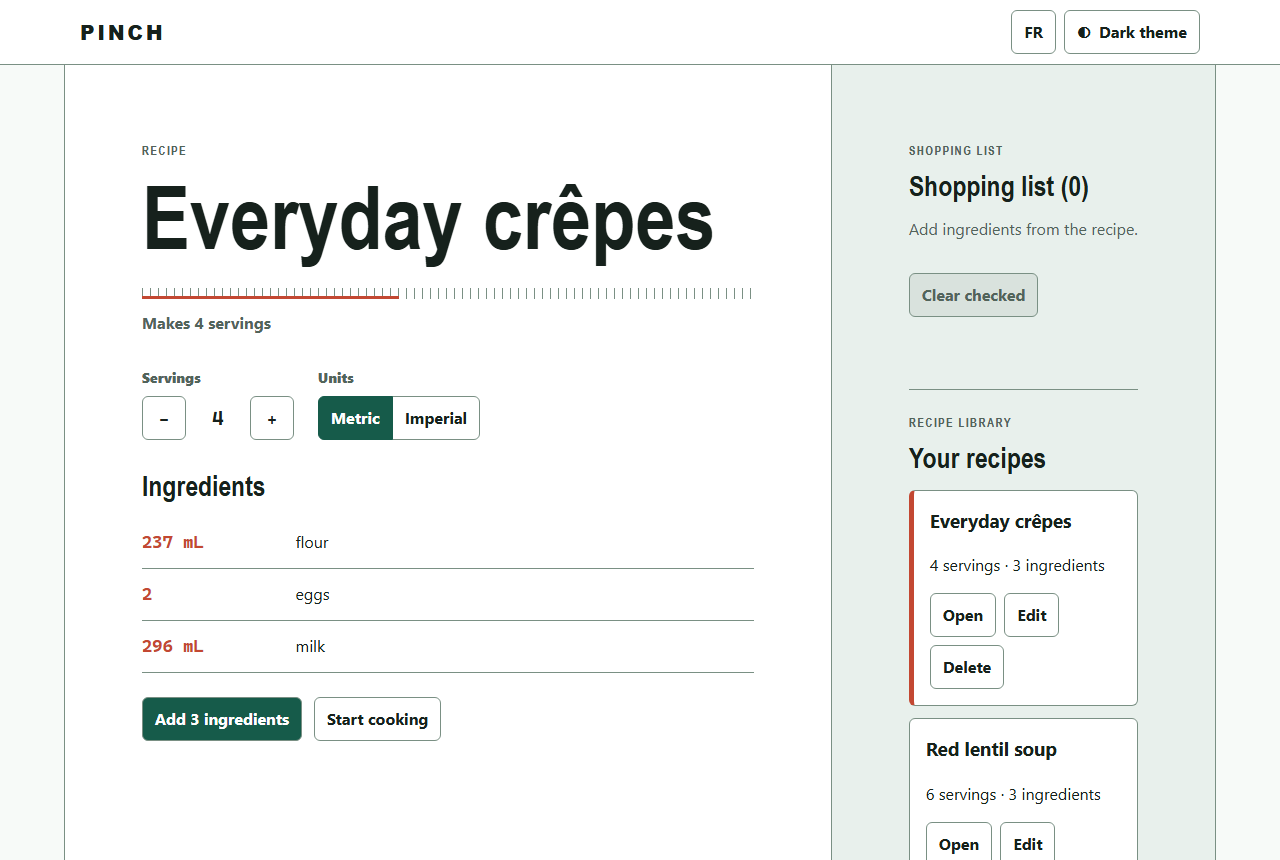
The smoke gate tests the live URL, not the build folder. The recorded run used a headless browser and checked:
| Check | Why it matters |
|---|---|
| HTTP 200 on the home page | The site exists. |
Manifest start_url and scope under the repository path |
The app installs from the right path. |
| Service worker scope matches the live URL | Offline mode covers the whole app. |
| All assets use the repository prefix | No file is requested from the domain root. |
| 0 requests to other origins | Nothing leaves the site. |
| 0 console errors and page errors | The app starts clean. |
| Offline reload succeeds | The PWA promise holds. |
Run the first check by hand, then open the page and reload it with DevTools set to offline:
Expected result
Status code 200, the app loads, and the page still renders after an offline reload.
Step 10: Make the release rollback-ready
The rollback-ready gate passes only when the rollback plan is written down before you need it. In the reference repository it is docs/deployment.md.
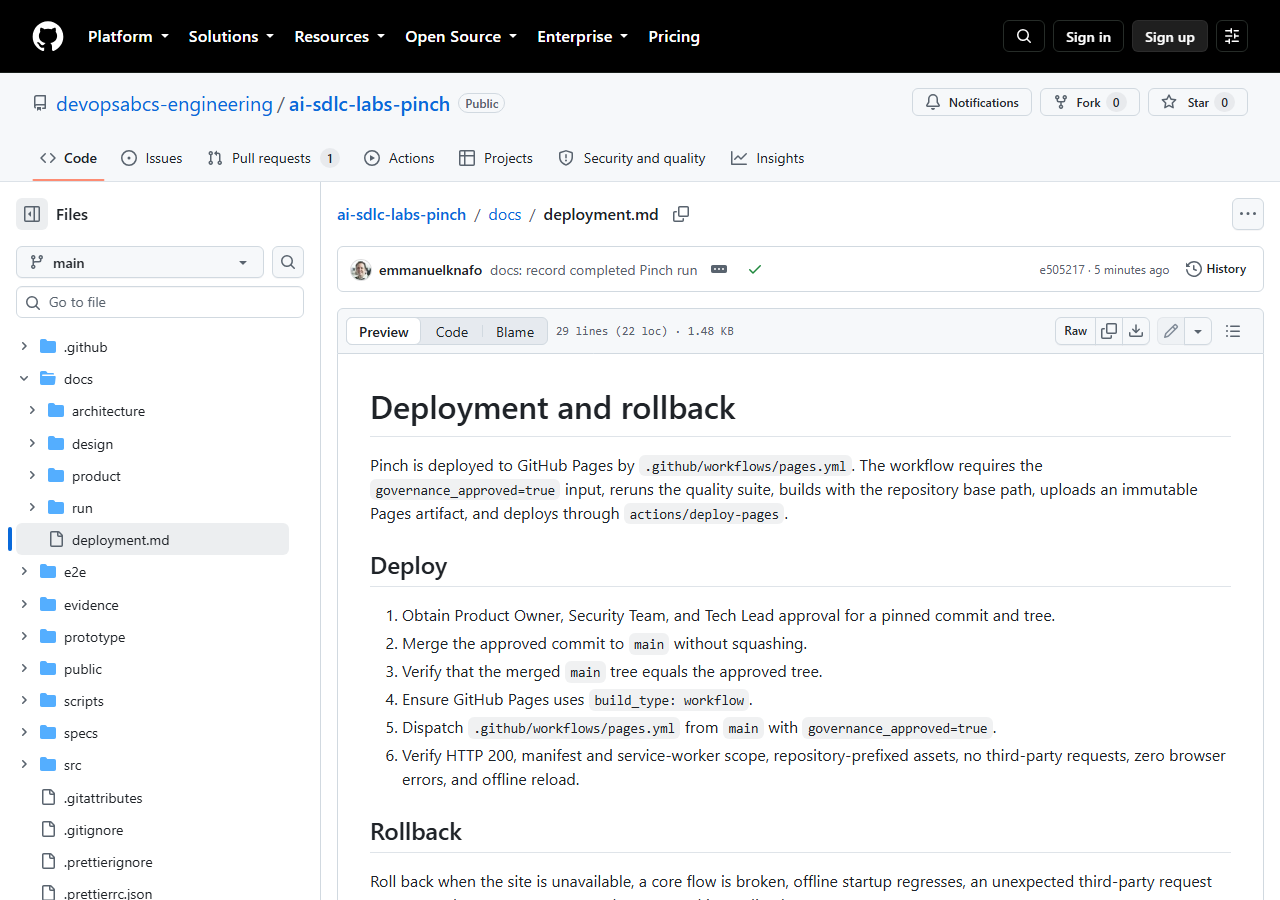
The recorded plan, in short: roll back when the site is unavailable, a core flow is broken, offline startup regresses, an unexpected third-party request appears or browser errors cannot be fixed at once. Then:
- Create a rollback branch from the current
main. - Restore the content from the last known-good pre-release commit (for Pinch:
2aa70d7db33767f50322d82495818de9ba83c24a). - Merge it through a reviewed pull request.
- Dispatch
pages.ymlwithgovernance_approved=true. - Repeat the complete smoke checks.
Each Pages deploy is an immutable artifact tied to one workflow run. Never roll back with a gh-pages branch or a manual upload.
Step 11: Record the release
Add the live URL to README.md and snapshot the run record under docs/run/<run-id>/ (Lab 8 explains the snapshot). In the reference repository this is commit e505217, which is also the tag lab-07-end.
Checkpoint
Check your work
-
signoff.statusisapprovedand HEAD matched the approved commit and tree before the push. - The pull request was merged with a merge commit (no squash).
-
Tree equality: OKprinted after the merge. - Pages uses the workflow build type, and the run of
pages.ymlended withsuccess. - The live URL returned
200and works after an offline reload. - A rollback plan is committed.
Compare with the reference repository at tag lab-07-end (commit e505217).
Bring your own idea
- Base path. On GitHub Pages the app lives under
/<repo>/. The Vite--basevalue inpages.ymlmust be your repository name, and so must the manifeststart_urlandscope. Change--base=/ai-sdlc-labs-pinch/in the workflow, and in your brief if it names the path. - Keep the governed input. Keep
governance_approvedand theif:condition on every job. Do not add a second deploy path. - Project gates. Derive your smoke checks from your own app: its start page, its offline promise, its third-party rules.
- Write the rollback plan first. Note the last known-good commit before you merge.
- Visibility. Check that your GitHub plan allows Pages for the visibility of your repository.
What went wrong in the recorded runs
- Pinch deployed on the first dispatch (run 37465190164, success, about 2 minutes). The pin, the tree equality and the smoke list were all checked around the push.
- Focus Garden had two failed releases for outside reasons. The first run was cancelled before any step ran, during a GitHub Actions incident, and was dispatched again after recovery. The second ran and failed at the performance gate:
tests/lighthouse-audit.mjshad a Windows Chrome path hardcoded, so on the Ubuntu runner it died withspawn ... chrome.exe ENOENT. Every local gate had passed on a Windows machine. - The fix was a change after approval. It was a two-line test change in its own pull request, so
mainwas no longer byte-identical to the approved commit5d3c73f. The wiki records this and notes that a stricter team would ask for a new sign-off. In your run, any change after approval resets sign-off. - The lesson is in the Pinch brief: no hard-coded OS paths, use Playwright's Chromium, and run the deploy workflow early.
Read the full story in the Focus Garden evidence page.
Troubleshooting
The site shows a 404 right after the merge
Pages serves nothing until the first workflow run ends with success. Check gh run list --repo $Repo --workflow pages.yml --limit 1, wait for the run, and reload.
The page loads blank or files return 404
The base path does not match the repository name. Open DevTools and look at the failing URLs: if they start at /assets/... instead of /<repo>/assets/..., rebuild with --base=/<repo>/ and dispatch again.
The workflow was cancelled, or every job was skipped
A cancelled run in which no step ran usually comes from a platform incident: dispatch again when GitHub reports that Actions has recovered. If every job shows as skipped, governance_approved was false: pass -f governance_approved=true.
The tree check fails
You merged with squash or rebase, or main changed after the approved commit. Do not deploy. Find the difference with git diff $tree origin/main and return to sign-off.
More help: Troubleshooting.
Knowledge check
Why compare trees and not commits?
A merge commit always has a new id, so commit ids differ. The tree id identifies the content, so equal trees prove that main holds exactly the approved files.
Why does the workflow ask for governance_approved?
It makes the human approval an explicit input to the release. The default is false, so a dispatch without the value deploys nothing.
When does the rollback-ready gate pass?
When the rollback plan is written and committed before the release, so you can use it in a bad moment without improvising.
Summary
You verified the approved pin, pushed, merged without squash, proved tree equality, enabled Pages, ran the governed workflow, checked the live site against the smoke list and wrote the rollback plan. The deployed code is the code that people approved.
Next steps
Continue with Lab 8: Resume, recover and tear down.