Lab 2: Design and prototype
Plan 35 min Beginner
Overview
This is the first lab where agents work. You run one bounded phase: the product designer turns the brief into journeys, wireframes and design tokens, then a prototype is built and checked in a real browser. The prototype is thrown away later: production code is built in Lab 4. Its job is to find UX problems while they are still cheap.
Learning objectives
By the end of this lab, you will be able to:
- Run the
ait-product-designskill and read its journeys, flows and design tokens. - Run the
ait-product-prototypeskill to get a clickable prototype. - Verify the prototype in a real browser with Playwright through
ait-prototype-testing. - Pass the
design-reviewandprototype-reviewgates, and explain what each one checks.
Cost and credits
About 284 credits for this lab in the recorded run
The recorded Lab 2 run used 284.39 credits. The design task took about 3 minutes. The wall time printed at the end (11h12m) is a timer artifact: the real time was roughly 15 to 25 minutes. See Cost and credits in Lab 0 for the general guidance.
To reduce the cost: ask for a static HTML prototype only, one sample item and a bounded phase, as the prompt below does.
Steps
Step 1: Start from a clean repository root
Always start copilot from the repository root. Make sure the brief is committed and keep run transcripts out of Git. The reference repository does the same: its lab-01-end commit is 22d3f4e ("chore: ignore console transcripts").
Set-Location -LiteralPath "$HOME\src\ai-sdlc-practice"
Add-Content .gitignore "evidence/logs/"
git status --short
Expected result
git status --short shows at most the .gitignore change. specs/idea.md is already committed.
Step 2: Run the design and prototype phase
The recorded run asked the orchestrator for Plan part 1 only: design, then prototype with browser testing. The prompt below follows that run:
New-Item -ItemType Directory -Force evidence\logs | Out-Null
copilot -p "Use the ait-sdlc-orchestrate skill. Specs: ./specs/idea.md. Run ONLY the first part of the Plan phase: ait-product-design, then ait-product-prototype with ait-prototype-testing. Build a static HTML prototype only (no web-artifacts-builder), with EN and FR strings and light and dark themes. Commit with Conventional Commits and stop. Do not push, do not deploy." --allow-all-tools --allow-all-paths --allow-all-urls --no-ask-user --share evidence\lab-02-design-prototype.md --log-dir evidence\logs
Interactive alternative. Run copilot from the repository root, then paste the same prompt text. You can answer questions and stop the run with Ctrl+C. In VS Code, use the /product-design and /product-prototype prompts instead.
These flags remove the safety questions
--allow-all-tools --allow-all-paths --allow-all-urls --no-ask-user let the agent run commands and write files without asking. Use them only in your practice repository, as in Lab 0.
Expected result
The run ends with a summary and a session id, and the orchestrator reports tasks T-001 and T-002. The tracking folder .copilot-tracking/<run-id>/ now has state.json, plan.md, tasks.md, decisions.md and changes.md.
Step 3: Read the design
Task T-001, "Design the Pinch experience", is owned by ait-product-designer and must pass the design-review gate. Its output is docs/design/pinch-experience.md (342 lines in the recorded run, committed as 8fa6d89, "docs(design): define Pinch prototype experience"). It contains EN and FR journeys, responsive wireframes, interaction states, accessibility requirements, and light and dark tokens.
Get-Content docs\design\pinch-experience.md | Select-Object -First 30
Select-String -Path docs\design\pinch-experience.md -Pattern '^## ' | ForEach-Object { $_.Line }
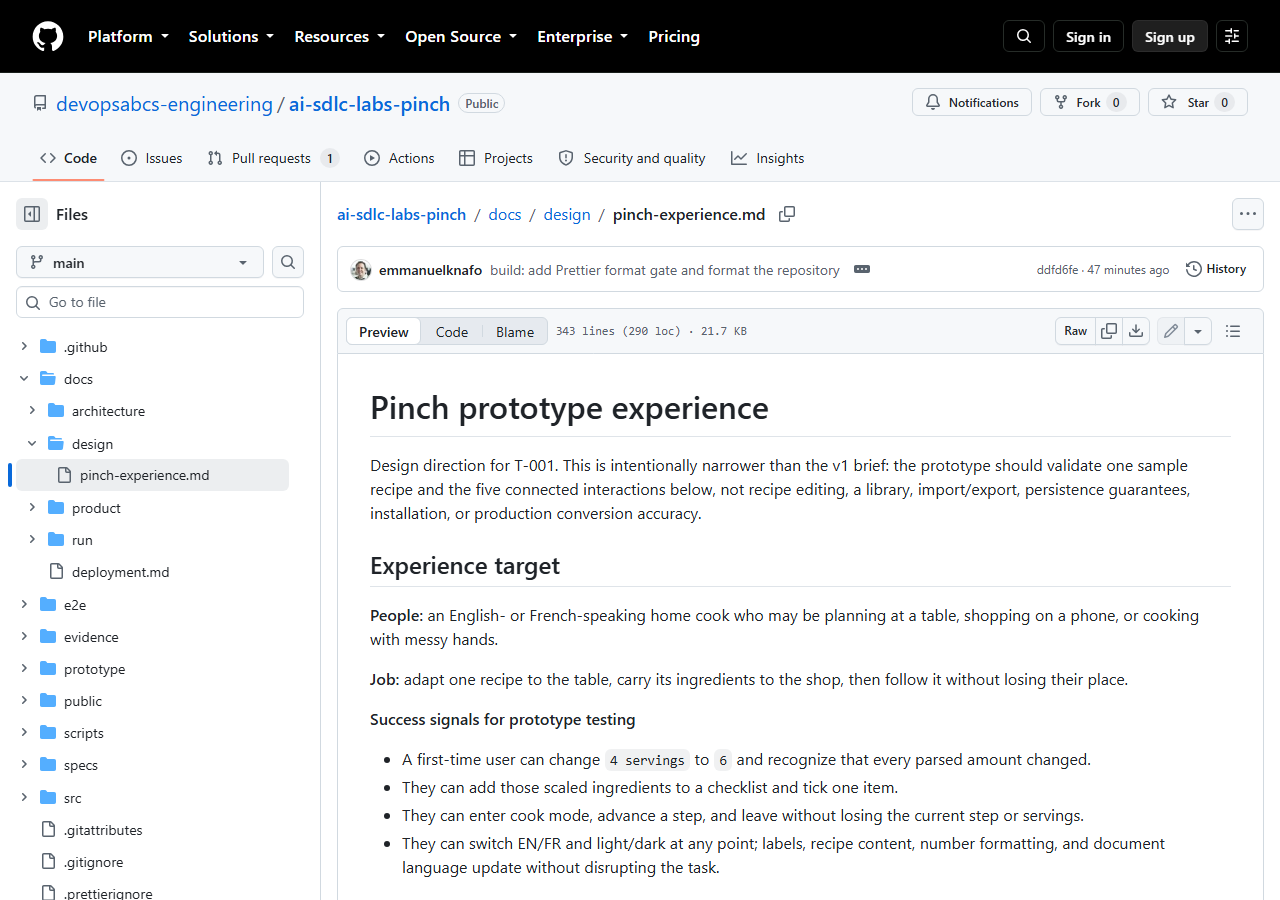
Read these decisions in the document, because they limit the prototype:
- One bilingual sample recipe, Crêpes / Crepes, with four ingredients and three steps.
- A three-step cook mode.
- Wake lock, swipe and motion are progressive enhancements, not required.
The success signals show how a design becomes testable:
- A first-time user can change `4 servings` to `6` and recognize that every parsed amount changed.
- They can enter cook mode, advance a step, and leave without losing the current step or servings.
The visual direction is named Measured enamel, with a semantic token contract such as --color-action: #165b4a for the light theme and #78d6b0 for the dark theme.
Step 4: Open the prototype and its evidence
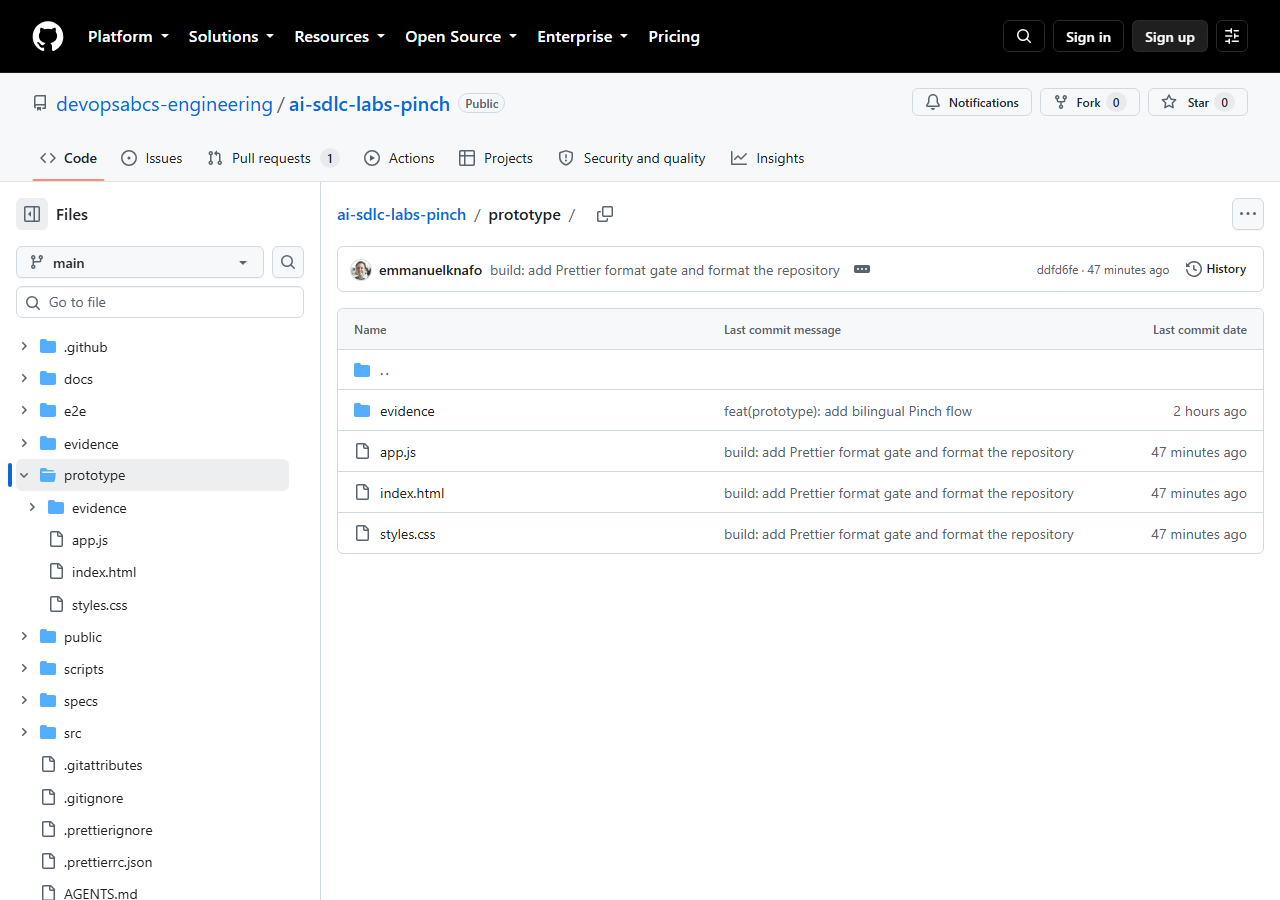
Task T-002, "Build and verify the prototype", must pass the prototype-review gate. It created three files in prototype/: index.html, styles.css and app.js, with clickable scaling, unit conversion, a shopping list, cook mode, theme switching and localization. It was committed as f1e66bb ("feat(prototype): add bilingual Pinch flow").
Start-Process prototype\index.html
Get-ChildItem prototype, prototype\evidence | Select-Object Name, Length
Try the flow by hand: change servings from 4 to 6, add the ingredients to the list and tick one, start cooking, press next, switch EN/FR and light/dark.
Expected result
The page opens offline in your browser and all five interactions work. prototype\evidence contains screenshots; in the recorded run they are desktop-cook-dark-fr.png and mobile-recipe-dark-fr.png.
A prototype is disposable
Do not polish it and do not build on it. Lab 4 builds the real app with Vite and TypeScript from the requirements and architecture of Lab 3.
Step 5: Check the two gates
Compare what each gate asks for with what you saw:
| Gate | What it checks | Evidence in the recorded run |
|---|---|---|
design-review |
The design is complete, state-ready, responsive, accessible, buildable and consistent. | The review notes at the end of docs/design/pinch-experience.md. |
prototype-review |
The prototype was driven in a real browser: flows, interaction states, console errors, responsive layout. | A headless Chromium test at 1024x768 and 360x800, with reduced motion and zero console errors. |
Check the tracking state and the commits:
Expected result
Both tasks are done, with their gates passed. Your commit list contains a docs(design) commit and a feat(prototype) commit. The reference run produced 8fa6d89 and f1e66bb.
Checkpoint
Tag lab-02-end
In the reference repository, lab-02-end is commit f1e66bb. It follows lab-01-end (22d3f4e).
git clone https://github.com/devopsabcs-engineering/ai-sdlc-labs-pinch "$HOME\src\ai-sdlc-labs-pinch"
Set-Location -LiteralPath "$HOME\src\ai-sdlc-labs-pinch"
git diff lab-01-end lab-02-end --stat
git checkout lab-02-end
Start-Process prototype\index.html
The diff lists 6 files with 1,242 insertions: the design document, the three prototype files and the two evidence screenshots. Return to the latest state with git checkout main.
Bring your own idea
Run the same flow on your own brief:
- Your
specs/idea.mdis committed and has 3 or 4 features. - Your prompt says "Run ONLY" the design and prototype part and ends with "Do not push, do not deploy".
- You asked for a static HTML prototype only and no
web-artifacts-builder. - You limited the sample to one item with a few lines of data, in both languages if your app is bilingual.
- After the run, you check both gates and the
.copilot-tracking/<run-id>/tasks.mdfile before moving on.
Cost-saving scope
Prototype only the two or three interactions that carry the most risk. The Pinch design deliberately validates one sample recipe and five connected interactions, not the whole v1 scope.
What went wrong in the recorded run
The first attempt at T-002 was blocked: the Playwright MCP was not available, so the browser-verification gate could not close. The orchestrator did not skip the gate. It found the cached playwright-core without installing anything, wrote a headless Chromium test and ran it. One assertion failed (the status announcement for a checked item); the orchestrator fixed it, and the test then passed at 1024x768 and 360x800 with reduced motion and zero console errors.
The lesson is the rule from the shared contract: a gate that cannot run is blocked, not skipped.
Troubleshooting
T-002 is blocked because the browser test cannot run
Do not waive the gate. Ask the orchestrator to run the test with Playwright's headless Chromium, as in the recorded run. If no browser is installed, npx playwright install chromium downloads one from the public registry. Then resume the run.
The run stopped or the terminal closed
State is saved in .copilot-tracking/<run-id>/state.json. Resume with copilot --resume=<session-id> (the id is printed at the end of each run), or start copilot again and ask the orchestrator to resume the run id. Finished tasks are not redone, and a task left in_progress is run again.
My prototype looks different from the screenshots
That is normal. Models vary, and the Measured enamel direction is the choice of this run. Judge your result with the gates and with the success signals in your own design document, not by pixels.
The run used more credits than expected
Check that the prompt says "Run ONLY" the first part of the Plan phase. A prompt that asks for the whole lifecycle starts later phases. Stop with Ctrl+C, then resume with a bounded prompt.
Knowledge check
What is the difference between design-review and prototype-review?
design-review checks the design document: complete journeys, states, responsive wireframes, accessibility and consistency. prototype-review checks the running prototype, driven in a real browser.
A gate cannot run. Can the agent mark it as skipped?
No. A required gate that cannot run blocks the task. Only a human waiver recorded in decisions.md can change that.
Why not keep the prototype as the first version of the app?
It is a spike made of plain files to test the experience. The real app is built in slices in Lab 4, from the requirements and architecture produced in Lab 3.
Summary
You ran the design and prototype phase in one bounded run, read the design document, tried the clickable prototype and checked the two gates. You saw that the browser gate was blocked first, and that the agent closed it with a real headless test instead of skipping it.
Next steps
Continue with Lab 3: Requirements and architecture, where the design becomes a PRD, architecture decisions and a backlog of build slices.