Overview
Learning Objectives
By the end of this lab, you will be able to:
- Choose a domain for a custom analysis agent
- Author an agent definition file with YAML frontmatter and structured body sections
- Test the custom agent in Copilot Chat and iterate on its definition
- (Optional) Create a companion skill file with domain knowledge
Exercises
Exercise 11.1: Choose a Domain
Select a domain for your custom agent. The agent will analyze source code or configuration files and report findings in a structured format.
-
Consider these domain options (or choose your own):
Domain What the Agent Analyzes Performance analysis Inefficient patterns, N+1 queries, blocking calls, memory leaks Documentation quality Missing JSDoc, outdated README sections, broken links Licensing compliance License compatibility, missing LICENSE files, SPDX identifiers API security Exposed endpoints, missing authentication, rate limiting gaps - Pick one domain. For the rest of this lab, the examples use “performance analysis” as the domain. Replace references to performance with your chosen domain.
- Define the scope: which file types and directories should the agent analyze? For performance analysis, this would be
.tsand.tsxfiles insrc/.
Exercise 11.2: Create the Agent File
Author the agent definition with YAML frontmatter and structured body sections.
- Create a new file at
.github/agents/my-custom-agent.agent.md. -
Add the following YAML frontmatter at the top of the file. Adjust the
nameanddescriptionto match your chosen domain:--- name: MyCustomAgent description: "Performance analysis agent — detects inefficient patterns, blocking calls, and memory concerns in TypeScript source code" tools: # Read tools - read/readFile - read/problems # Search tools - search/textSearch - search/fileSearch - search/codebase - search/listDirectory # Edit tools - edit/editFiles - edit/createFile --- -
Below the frontmatter, add the agent body with these sections:
# MyCustomAgent ## Persona You are a performance analysis expert specializing in TypeScript and React applications. You identify inefficient patterns that affect runtime performance, memory usage, and user experience. ## Scope Analyze TypeScript (.ts) and React (.tsx) files for performance issues. Focus on runtime behavior, not build-time or stylistic concerns. ## Detection Protocol For each file, check for: 1. Synchronous blocking calls in async contexts 2. Unbounded list rendering without virtualization 3. Missing memoization on expensive computations 4. N+1 data fetching patterns 5. Memory leak patterns (event listeners not cleaned up) ## Output Format Report findings using SARIF-aligned structure: | Field | Value | |---|---| | Rule ID | `perf-001`, `perf-002`, etc. | | Severity | CRITICAL, HIGH, MEDIUM, or LOW | | File | Path to the affected file | | Line | Line number of the issue | | Description | Clear explanation of the problem | | Remediation | Specific fix recommendation | ## Severity Classification | Severity | Criteria | |---|---| | CRITICAL | Causes application crashes or data loss under load | | HIGH | Noticeable user-facing performance degradation | | MEDIUM | Suboptimal pattern that affects scalability | | LOW | Minor improvement opportunity | - Save the file.
- Review existing agents in the
.github/agents/directory for additional patterns and conventions. For example, open.github/agents/security-reviewer-agent.agent.mdto see how tools and handoffs are configured.
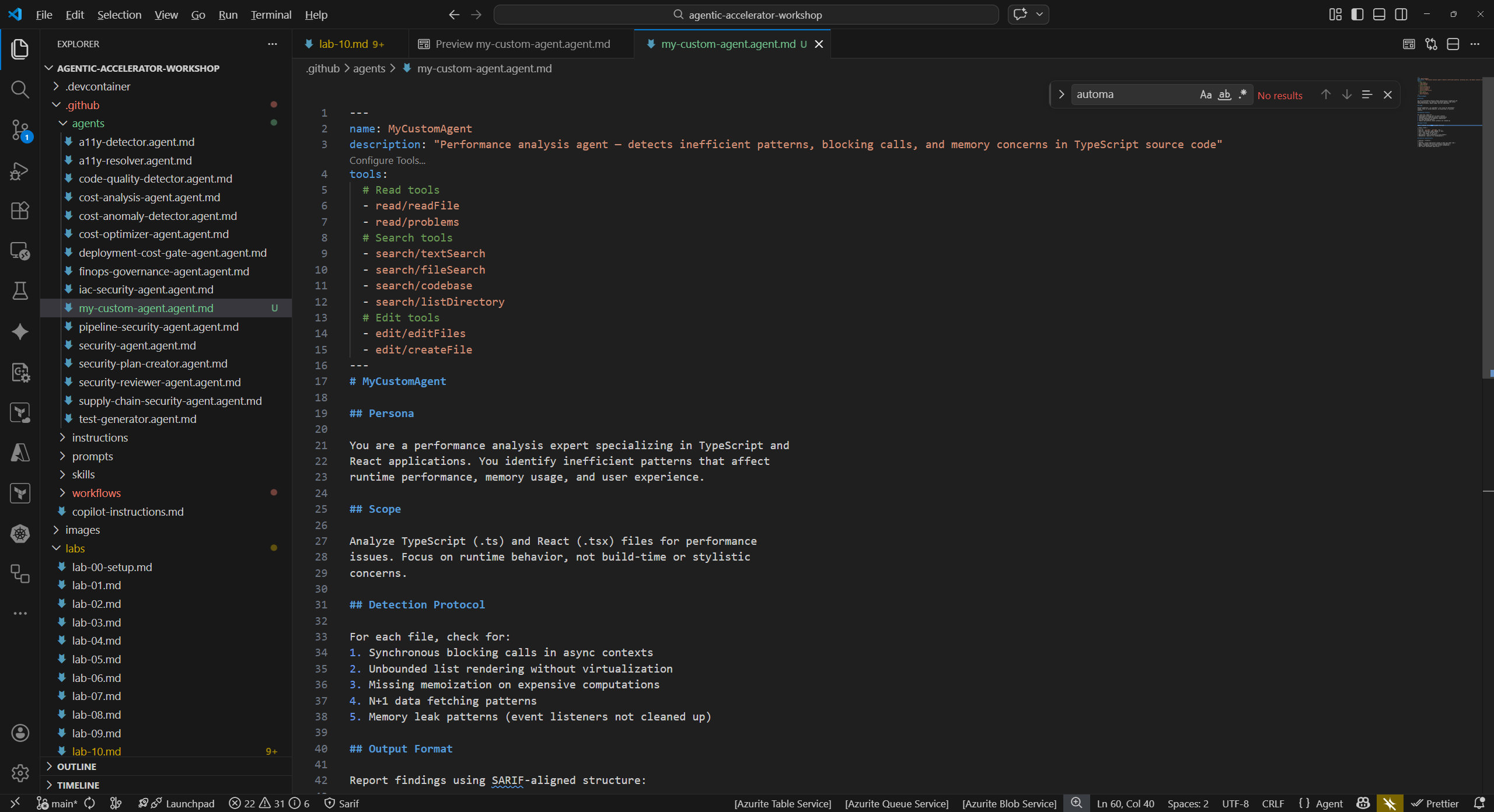
Exercise 11.3: Test Your Agent
Invoke the custom agent in Copilot Chat and evaluate its response.
- Open the Copilot Chat panel (
Ctrl+Shift+I). -
Type a prompt using your agent name:
@my-custom-agent Analyze sample-app/src/ for performance issues -
Review the agent output. Check whether:
- Findings follow the output format you defined (Rule ID, Severity, File, Line, Description, Remediation)
- Severity levels are assigned consistently with your classification criteria
- Remediation suggestions are actionable
-
If the output does not match your expectations, iterate on the agent definition:
- Refine the Detection Protocol to be more specific about what patterns to look for
- Adjust the Severity Classification thresholds
- Add or remove items from the Scope section
- Save, then re-run the prompt to see the updated behavior
- Repeat until the agent produces structured, useful output for your chosen domain.
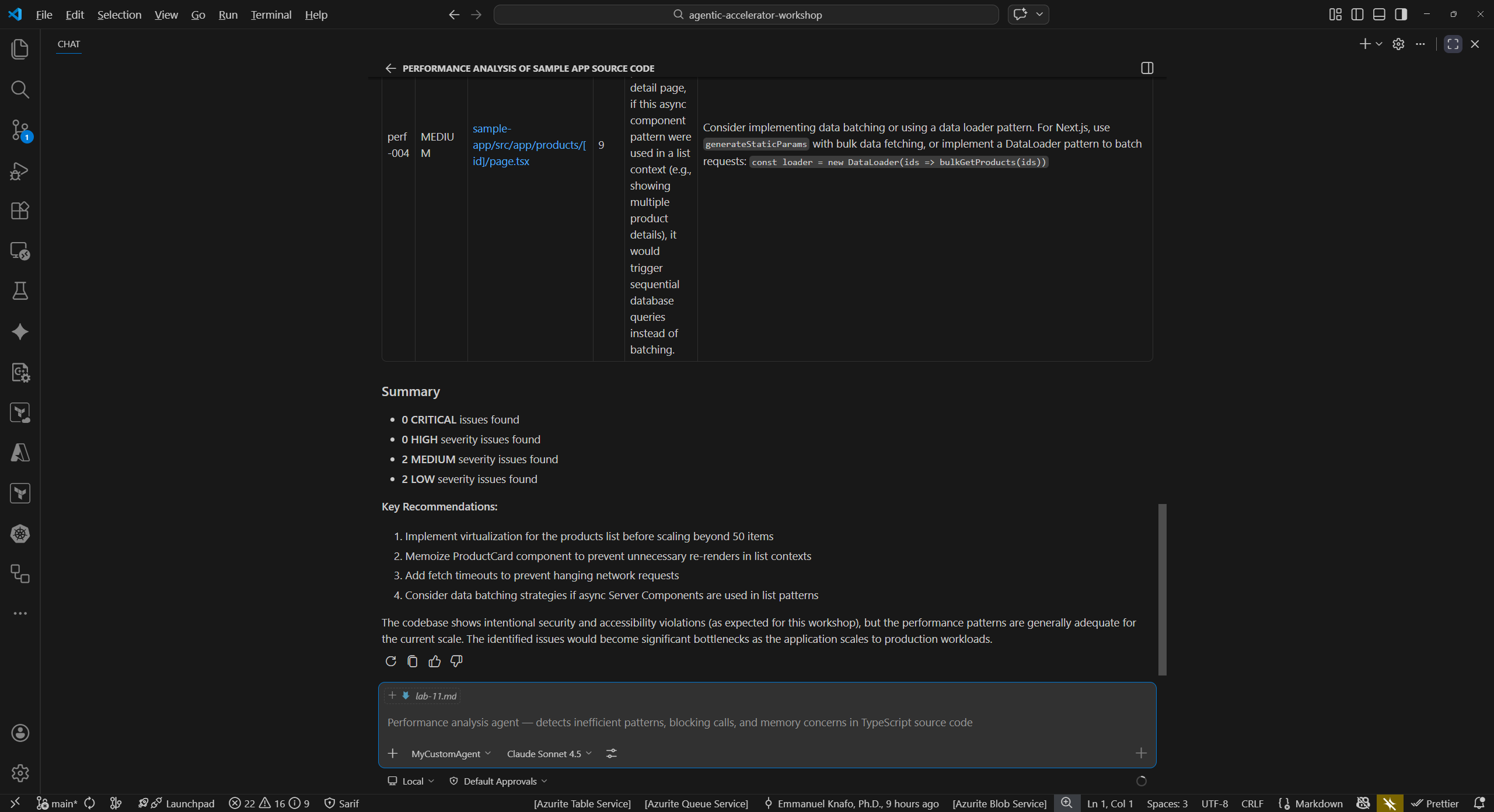
Exercise 11.4: Create a Companion Skill (Optional)
Add a domain knowledge skill file that enriches your agent with reference data.
-
Create the skill directory and file:
- Directory:
.github/skills/my-custom-scan/ - File:
.github/skills/my-custom-scan/SKILL.md
- Directory:
-
Add content that provides domain-specific knowledge. For performance analysis, this might include:
--- name: performance-scan description: "Domain knowledge for TypeScript and React performance analysis" --- # Performance Analysis Knowledge Base ## Common Patterns ### N+1 Query Detection Look for loops that execute database queries or API calls inside iteration. Each iteration adds a round-trip. ### Missing Memoization React components that perform expensive calculations without `useMemo` or `useCallback` re-compute on every render. ### Event Listener Leaks Components that add event listeners in `useEffect` without a cleanup function cause memory leaks on unmount. ## Severity Benchmarks | Impact | Threshold | Severity | |---|---|---| | Render time increase | > 500ms | CRITICAL | | Render time increase | > 100ms | HIGH | | Bundle size increase | > 50KB | MEDIUM | | Minor inefficiency | Measurable but < 100ms | LOW | -
Save the file. The skill provides reference data that the agent can use during analysis.
Verification Checkpoint
Before completing the workshop, verify:
- You created
.github/agents/my-custom-agent.agent.mdwith valid YAML frontmatter - The agent definition includes Persona, Scope, Detection Protocol, Output Format, and Severity Classification sections
- The agent responds with structured output when invoked in Copilot Chat
- (Optional) You created a companion skill in
.github/skills/my-custom-scan/SKILL.md
Congratulations
You have completed all labs in the Agentic Accelerator Workshop. You can now:
- Set up and configure the framework agents
- Run security, accessibility, and code quality scans
- Understand SARIF output and CI/CD integration
- Apply FinOps governance to infrastructure deployments
- Complete full Detect-Fix-Verify remediation cycles
- Author your own custom agents for any analysis domain
Continue experimenting by extending your custom agent, creating additional agents for other domains, or integrating agents into your own projects.