[!IMPORTANT] Use synthetic prompts only. LLM message logging stays off on every API, so the lab never records prompts or completions in telemetry; only token counts and bounded dimensions leave the gateway. Session images appear on this site only after a maintainer reviews sanitized evidence.
Overview
| Item | Value |
|---|---|
| Duration | 40 minutes, including ingestion delay |
| Level | Intermediate |
| Prerequisites | Lab 02 completed and Application Insights values in .env |
notebooks/demo2-token-metrics.ipynb meters the tokens that Lab 02 governed. An API-scope llm-emit-token-metric policy publishes prompt, completion, and total token metrics split by API ID, Subscription ID, and a bounded ClientApp value. Design the dimensions before the dashboards: the cardinality budget is five custom dimensions, about 100 values per dimension, and 1,000 active series.
Application Insights has local authentication disabled, so the notebook’s logger demo2-application-insights sends metrics with the APIM managed-identity credential and the Monitoring Metrics Publisher role. A logger that has only a connection string fails visibly instead of silently re-enabling local authentication. The Bicep-owned platform logger apimlogger is never written by a notebook.
[!IMPORTANT] The API diagnostic keeps
metrics: trueand captures no LLM request or response messages. The notebook reads the diagnostic back after configuration and fails if message capture appears. Missing telemetry is never treated as proof of privacy or as zero usage.
Learning Objectives
By the end of this lab, you will be able to:
- Explain why business dimensions such as
ClientAppmust stay bounded - Configure a managed-identity Application Insights logger and verify it by readback
- Confirm that metrics are enabled while message capture stays off
- Query token metrics split by
ClientAppand allow for ingestion delay - Reconcile metric sums against the usage the model reported
Exercises
Exercise 3.1: Read the metric policy
Get-Content policies/demo2-emit-token-metric.xml
Expected result: one llm-emit-token-metric element with the dimensions API ID, Subscription ID, and ClientApp, where ClientApp defaults to unknown when the header is absent.
The client helper refuses any x-client-app value outside its allowlist (claims-portal and analyst-copilot), so only two business series can appear.
Exercise 3.2 (Hands-on): Run the preflight checks
Open notebooks/demo2-token-metrics.ipynb and run the preflight section.
Expected result: each prerequisite reports a status. On a first run, only an absent logger and an absent diagnostic are accepted as expected states, and both must be present after configuration.
Exercise 3.3 (Hands-on): Configure and read back
Run the configure section.
Expected result: the logger, diagnostic, and policy are applied with idempotent PUT calls, and the readback confirms the managed-identity logger credential, metrics: true, and no message capture. This records demo2.logger_configured and demo2.no_message_capture.
Exercise 3.4 (Hands-on): Generate the planned split
Run the baseline and demonstrate sections.
Expected result: one baseline call, then five calls as claims-portal and three calls as analyst-copilot, each within the session envelope.
Before the baseline, the notebook sends unscored warm-up calls until the new API, subscription, and policy answer through the gateway. A successful warm-up is metered as claims-portal, so its provider usage is included in the reconciliation.
Exercise 3.5 (Hands-on): Query and reconcile
Run the verify and acceptance sections.
Expected result: two ClientApp series appear in the Application Insights customMetrics table, and prompt plus completion sums match the reported response usage within the stated tolerance. This records demo2.dimensions_observed and demo2.metrics_reconciled.
Ingestion delay is normal, so the query polls with backoff for a bounded time. If the deadline passes, the objective is not passed; an empty chart is not evidence of zero tokens.
[!NOTE] For streaming responses, request usage from the provider with
stream_options: {"include_usage": true}where supported. An interrupted stream can produce incomplete counts because the final usage event may never arrive. The main flow uses non-streaming calls so the counts reconcile.
Exercise 3.6: Review the session evidence
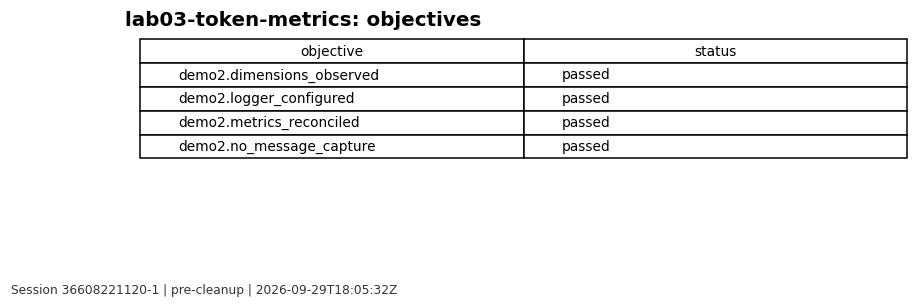
[!NOTE] Reviewed evidence from session
36608221120-1(workflow run), rendered on 2026-09-29 from sanitized results only.
Validation Checklist
- The logger uses the managed-identity credential, not a connection string alone
- The diagnostic readback shows
metrics: trueand no message capture - Exactly two
ClientAppseries appeared - Prompt and completion sums reconciled with response usage
- All four Demo 2 objectives have a recorded status
Knowledge Check
- Why must a run identifier stay out of the
ClientAppdimension? - What happens when Application Insights disables local authentication and the logger has only a connection string?
- Why is an empty metric chart not evidence that no tokens were consumed?
- Why is
ClientAppa caller assertion rather than an authenticated identity?
Next Steps
Continue to Lab 04: Content safety.