[!IMPORTANT] Use synthetic prompts only. LLM message logging stays off on every API, so the lab never records prompts or completions in telemetry; only token counts and bounded dimensions leave the gateway. Session images appear on this site only after a maintainer reviews sanitized evidence.
Overview
| Item | Value |
|---|---|
| Duration | 20 minutes |
| Level | Beginner |
| Prerequisites | Lab 00 environment or an existing APIM instance, Python 3.10 or newer, and the Azure CLI |
notebooks/00-setup-and-validation.ipynb is the shared prerequisite for every demonstration notebook. It confirms your Azure CLI identity, captures the resource group and APIM instance name, verifies that the gateway is reachable, reports the SKU, and checks the Content Safety resource that Lab 04 needs. It creates or modifies no Azure resources.
Interactively, the notebook prompts for missing values and persists them to a local .env file that is never committed. In an automated session, scripts/lab_session.py write-env writes the complete .env from the deployment outputs, and AIGOV_HEADLESS=1 turns every would-be prompt into an error that names the missing key.
Learning Objectives
By the end of this lab, you will be able to:
- Confirm the signed-in Azure identity and subscription without exposing credentials
- Explain the configuration precedence of environment variables, the
.envfile, and interactive prompts - Validate that the APIM gateway is reachable and supports the policies the labs use
- Explain why headless mode fails instead of prompting
- Read the structured objective results that replace console banners as the acceptance record
Exercises
Exercise 1.1: Prepare the Python environment
python -m venv .venv
.venv\Scripts\Activate.ps1
pip install -r requirements.txt
az login
az account show --query "{name:name, id:id}" -o table
Expected result: the last command prints the subscription you intend to use.
The notebooks use AzureCliCredential and fall back to DefaultAzureCredential. They never open an interactive browser sign-in.
Exercise 1.2 (Hands-on): Run the setup notebook
jupyter notebook notebooks/00-setup-and-validation.ipynb
Run every cell from top to bottom.
Expected result: the notebook prints the gateway URL and SKU, reports the Content Safety resource check, and persists your answers to .env. Secrets such as API keys and subscription keys appear masked, never in full.
Demo 1 and Demo 3 need llm-token-limit and llm-content-safety, which Basic v2 supports. Demo 4 needs backend pools and circuit breakers, which Basic v2, Standard v2, Premium v2, and classic Standard and Premium support.
Exercise 1.3: Observe headless behavior
$env:AIGOV_HEADLESS = "1"
python -c "from shared.config import load_config; load_config()"
Remove-Item Env:AIGOV_HEADLESS
Expected result: with a complete .env, the command returns without prompting. With a missing required key, it raises ConfigError naming the key. When a key exists in both the process environment and .env with different values, it raises and lists key names only, never values.
DEMO_RUN must come from .env alone, so an inherited DEMO_RUN environment variable counts as a conflict in headless mode.
Exercise 1.4: Read the objective results
Get-ChildItem outputs/results -Recurse -Filter *.json | Select-Object FullName
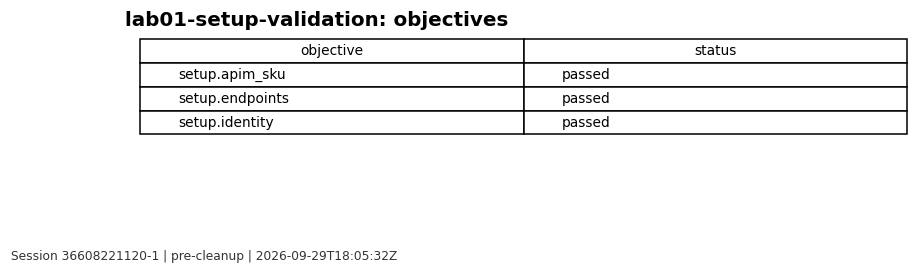
Expected result: the setup result file records setup.identity, setup.endpoints, and setup.apim_sku, each with the status passed, failed, or inconclusive and allowlisted scalar evidence only.
The banners in the notebook are for people. The result file is the acceptance record that the session checker reads.
Exercise 1.5: Review the session evidence
[!NOTE] Reviewed evidence from session
36608221120-1(workflow run), rendered on 2026-09-29 from sanitized results only.
Validation Checklist
az account showreturns the intended subscription- The setup notebook printed the gateway URL and SKU
.envexists locally and is not tracked by Git- Headless mode fails on a missing key instead of prompting
- All three setup objectives have a recorded status
Knowledge Check
- Which source wins when the same key is set in the environment and in
.envduring an interactive run? - Why does headless mode treat an inherited
DEMO_RUNvalue as a conflict? - Why is a printed PASS banner not accepted as completion evidence?
Next Steps
Continue to Lab 02: Token limits and quotas.