[!IMPORTANT] Use synthetic prompts only. LLM message logging stays off on every API, so the lab never records prompts or completions in telemetry; only token counts and bounded dimensions leave the gateway. Session images appear on this site only after a maintainer reviews sanitized evidence.
Overview
| Item | Value |
|---|---|
| Duration | 45 minutes, plus approval and provisioning time |
| Level | Intermediate |
| Prerequisites | Completed administrative bootstrap, reviewer rights on the lab GitHub environment, and an approved model tuple |
The environment is one resource group deployed from infra/main.bicep: an APIM Basic v2 instance with a user-assigned managed identity, one approved model deployment, an Azure AI Content Safety resource, a Log Analytics workspace, and workspace-based Application Insights. The platform API ai-gateway-api uses the backend ai-gateway-foundry and serves three team products: team-retail, team-finance, and team-hr.
[!WARNING] Basic v2 is a conditional choice. Its gateway is a public endpoint with no inbound private endpoint and no private backend connectivity, so the deployment requires explicit approval of public exposure. When private networking is required, choose Standard v2 and validate that topology separately. Documented policy support is not proof of a working lab until the session evidence passes.
An administrator runs scripts/bootstrap-lab.ps1 once, outside any workflow. It creates the lab resource group, a separate identity resource group holding the APIM user-assigned identity, the custom roles, the two federated deployment and runtime identities, and the protected lab environment. Workflows never run the bootstrap and never write role assignments.
Learning Objectives
By the end of this lab, you will be able to:
- Explain what the administrative bootstrap creates and why workflows never run it
- Choose the
lab-session.ymlmode that matches the authority you intend to grant - Read the preflight and what-if output of a dry run before you approve a paid deployment
- Explain how the manifest record limits later cleanup to resources this session created
- Interpret the readiness summary and the session budget envelope
Exercises
Exercise 0.1: Read the approved parameters
Get-Content infra/main.bicepparam
Expected result: chatModelName, chatModelVersion, chatDeploymentSku, chatDeploymentCapacity, aiLocation, and generation have no defaults, and allowGlobalProcessing is false.
No model, version, SKU, region, or capacity is chosen for you. Canadian resource placement does not approve global inference processing, so preflight rejects Global deployment types unless allowGlobalProcessing is explicitly set.
Exercise 0.2: Compile the templates without credentials
az bicep build --file infra/main.bicep
az bicep build-params --file infra/main.bicepparam
Expected result: az bicep build succeeds without credentials and with no warnings other than documented suppressions. az bicep build-params succeeds only after every AIGOV_* variable listed in infra/README.md is set in your shell; until then it fails and names the missing variable, so no model, region, or identity is ever guessed from source control.
Compilation proves the templates are well formed. It does not prove quota, capacity, model eligibility, or that the policies behave as intended.
Exercise 0.3: Choose a session mode
Each mode grants a different authority. Cleanup always acts only on resources recorded by the current session’s own manifest.
| Mode | Deploys | Runs notebooks and traffic | Cleanup |
|---|---|---|---|
dry-run |
No | No | None; stops after preflight and what-if |
full-session |
Yes | Yes | On success and failure unless keep_environment=true |
deploy-only |
Yes | No | Only when deployment or readiness fails |
run-existing |
No; verifies the manifest | Yes | None; the environment is preserved |
report-only |
No; verifies the manifest | Showback report only | None; the environment is preserved |
lock-test |
No | No | None; rehearses the workflow lock without Azure |
Expected result: you can name the mode that preserves resources on failure (run-existing and report-only) and the only flag that keeps a full-session environment (keep_environment=true, which also reports continuing cost exposure).
Exercise 0.4 (Hands-on): Run a dry run
gh workflow run lab-session.yml -f mode=dry-run -f generation=<generation> -f confirm_resource_group=<resource-group>
Expected result: after a reviewer approves the lab environment, the session logs in with the deployment identity, runs preflight and what-if, and stops. No manifest record, deployment, or cleanup occurs.
Preflight checks the model tuple, provider registration, API Management regional availability, model quota, Content Safety availability, and soft-deleted APIM, Cognitive Services, and Log Analytics names that would collide. What-if fails on unexpected deletes or changes outside the planned resource IDs.
Exercise 0.5 (Hands-on): Deploy and read readiness
Start a full-session or deploy-only run with the same inputs and approve it. These modes, like run-existing, refuse to start unless the repository variable AIGOV_PRICE_SNAPSHOT points to an approved price snapshot file under scripts/prices/.
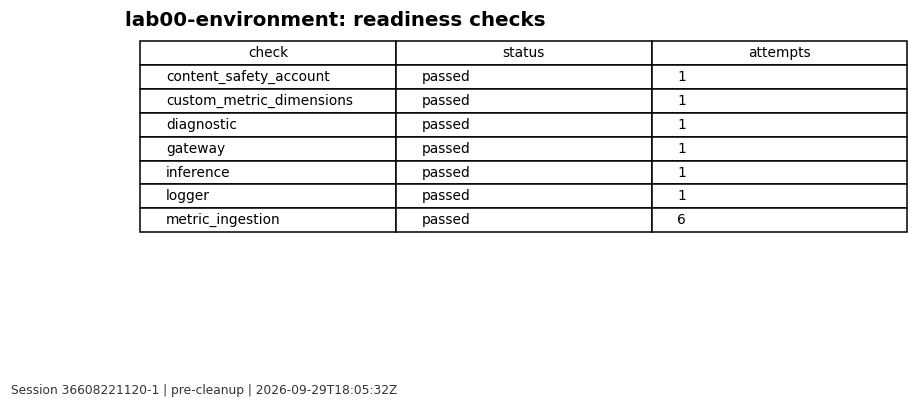
Expected result: the session writes an append-only manifest record named aigov-manifest-<generation>-<session_id>-<hash8> before any mutation, deploys incrementally, and writes outputs/readiness/<session_id>/summary.json with one status per check.
Readiness polls the gateway, the logger and diagnostic readback including custom-metric dimensions, the Content Safety account provisioning state, a model call through the platform API at /ai-gateway, and first metric ingestion. The first Content Safety call through the gateway happens in Lab 04. A readiness or scope-probe failure skips every notebook, traffic, and showback step; evidence and the mode’s cleanup still run. The session envelope caps attempts, reserved tokens, estimated spend, and wall-clock time, and every model or safety call reserves against it before dispatch.
Exercise 0.6: Review the session evidence
[!NOTE] Reviewed evidence from session
36608221120-1(workflow run), rendered on 2026-09-29 from sanitized results only.
Validation Checklist
- The model tuple and generation are explicit and approved
- You approved public exposure for Basic v2 or chose Standard v2 for private networking
- A dry run completed and its what-if output matched the planned resources
- The manifest record exists before any deployed resource
- Every readiness check reports a status in the summary
Knowledge Check
- Why does the bootstrap run once as an administrator instead of inside a workflow?
- Which modes can delete resources, and under which outcomes?
- What does a readiness failure skip, and what still runs?
- Why is a successful
az bicep buildnot evidence that the lab works?
Next Steps
Continue to Lab 01: Setup and validation.