Lab 05: MCP Configuration Validation
| Duration | Level | Prerequisites |
|---|---|---|
| 30 min | Intermediate | Lab 04 |
Learning Objectives
- Run the MCP configuration validator on demo apps
- Understand server allowlists and transport security requirements
- Detect overly broad tool permissions
Exercise 1: Review the MCP Allowlist
Working Directory: Run the following commands from the
apm-security-scan-demo-apprepository root.
Get-Content src\config\mcp-allowlist.json | python -m json.tool
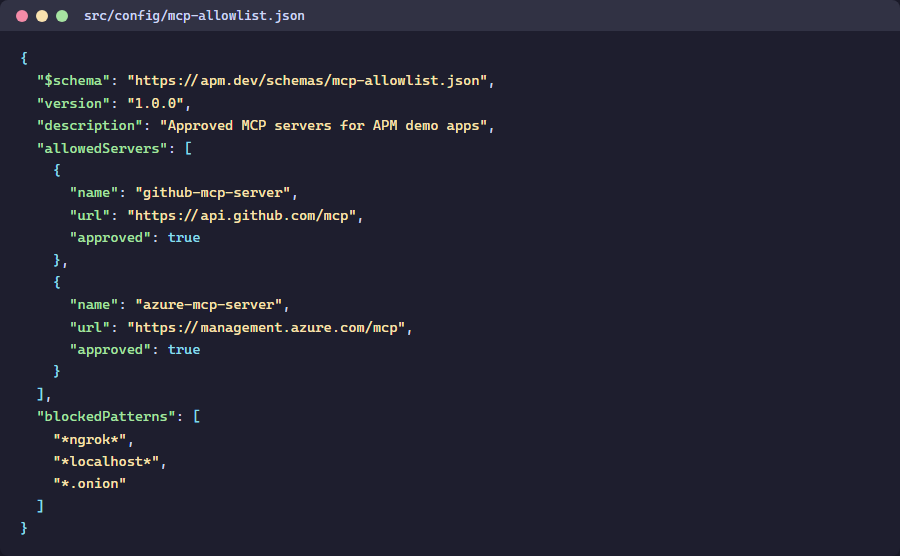
Exercise 2: Scan App 003 (MCP Violations)
python src\converters\mcp-to-sarif.py --scan-dir apm-demo-app-003 --output app003-mcp.sarif
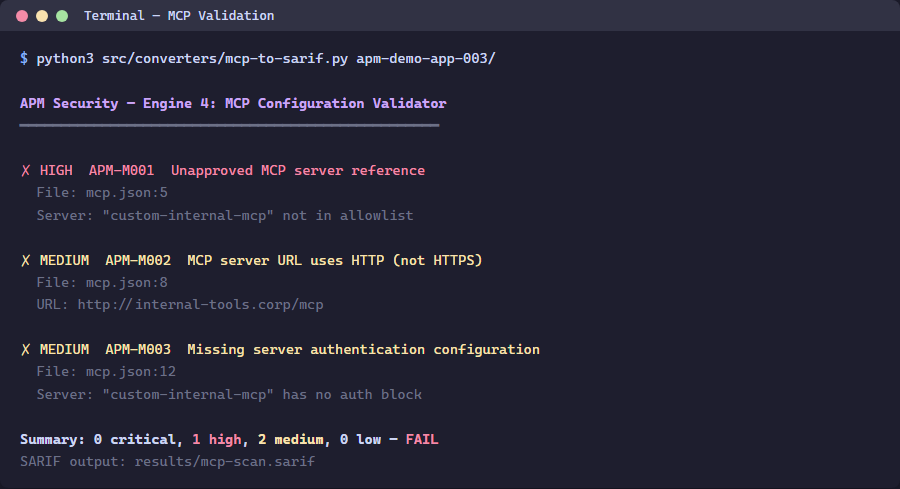
Exercise 3: Review Findings
python -c "import json; d=json.load(open('app003-mcp.sarif')); [print(f'{r[\"ruleId\"]}: {r[\"message\"][\"text\"]}') for r in d['runs'][0]['results']]"
Exercise 4: Fix a Violation
Edit apm-demo-app-003\mcp.json to remove the rogue-data-server entry, then re-scan:
python src\converters\mcp-to-sarif.py --scan-dir apm-demo-app-003 --output app003-mcp-fixed.sarif
Verify the finding count decreased.
Verification Checkpoint
- MCP validator produces findings for app 003
- You understand server allowlists and transport security
- Removing a rogue server reduces the finding count
Next Steps
Proceed to Lab 06: GitHub Security Tab or Lab 06 ADO.