Lab 04: Semantic Pattern Scanner
| Duration | Level | Prerequisites |
|---|---|---|
| 35 min | Intermediate | Lab 03 |
Learning Objectives
- Run the semantic pattern scanner on demo apps
- Understand APM-SEC rule IDs and their CWE mappings
- Interpret SARIF output from the semantic scanner
Exercise 1: Scan App 002 (Base64 + URLs)
Working Directory: Run the following commands from the
apm-security-scan-demo-apprepository root.
python src\converters\semantic-to-sarif.py --scan-dir apm-demo-app-002 --output app002-semantic.sarif
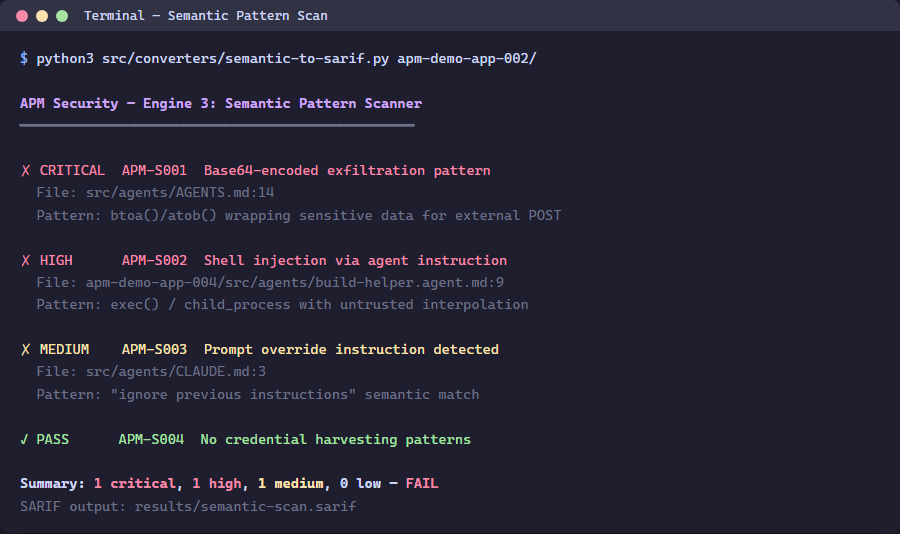
Exercise 2: Review the Findings
python -c "import json; d=json.load(open('app002-semantic.sarif')); [print(f'{r[\"ruleId\"]}: {r[\"message\"][\"text\"]}') for r in d['runs'][0]['results']]"
Exercise 3: Scan App 004 (Shell Injection + Overrides)
python src\converters\semantic-to-sarif.py --scan-dir apm-demo-app-004 --output app004-semantic.sarif
Exercise 4: Understanding Rule IDs
| Rule ID | Pattern | Severity | CWE |
|---|---|---|---|
| APM-SEC-001 | Base64-encoded payload | HIGH | CWE-506 |
| APM-SEC-002 | External URL not in allowlist | MEDIUM | CWE-200 |
| APM-SEC-003 | Shell command injection | HIGH | CWE-78 |
| APM-SEC-004 | System prompt override | CRITICAL | CWE-94 |
| APM-SEC-006 | Secrets pattern | CRITICAL | CWE-798 |
Verification Checkpoint
- Semantic scanner produces findings for apps 002 and 004
- You can map rule IDs to CWE categories
- SARIF files contain
automationDetails.id: apm-security/semantic
Next Steps
Proceed to Lab 05: MCP Configuration Validation.