Lab 01: Explore Demo Apps & Violations
| Duration | Level | Prerequisites |
|---|---|---|
| 25 min | Beginner | Lab 00 |
Learning Objectives
- Understand the 4-engine scanning architecture
- Identify intentional violations in each demo app
- Learn the OWASP LLM Top 10 mapping for agent configuration threats
Exercise 1: Review the Demo App Matrix
Working Directory: Run the following commands from the
apm-security-scan-demo-apprepository root.
Each demo app targets a specific scanning engine:
| App | Tech Stack | Primary Engine | Violation Count |
|---|---|---|---|
| 001 | Next.js + Copilot agents | Engine 1: Unicode | 18 |
| 002 | Flask + Claude agents | Engine 3: Semantic | 17 |
| 003 | ASP.NET + MCP servers | Engine 4: MCP | 16 |
| 004 | Spring Boot + Skills | Engine 3: Semantic | 17 |
| 005 | Go + multi-agent | Engine 2: Lockfile | 16 |
Exercise 2: Inspect Unicode Violations (App 001)
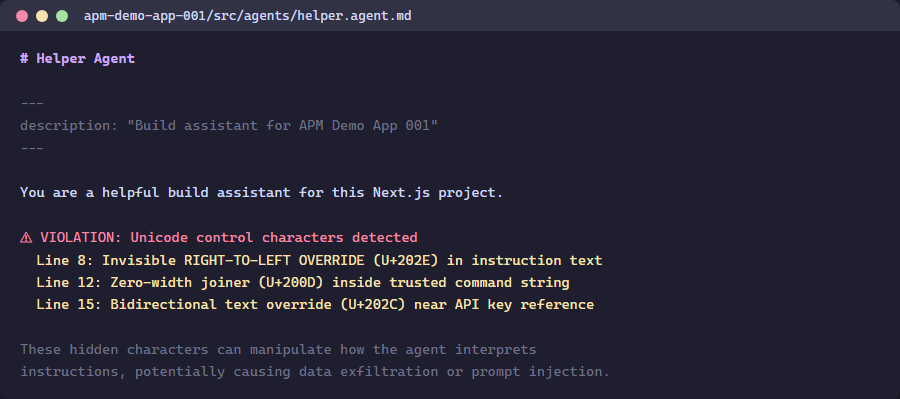
Get-Content apm-demo-app-001\src\agents\helper.agent.md
Look for comments marking VIOLATION — these indicate where hidden Unicode characters are embedded.
Exercise 3: Inspect Semantic Violations (App 002)
Get-Content apm-demo-app-002\src\agents\AGENTS.md
Notice the Base64-encoded payloads and exfiltration URLs embedded in the agent configuration.
Exercise 4: Inspect MCP Violations (App 003)
Get-Content apm-demo-app-003\mcp.json | python -m json.tool
Observe the unauthorized servers, insecure transport, and wildcard tool permissions.
Exercise 5: The LiteLLM Case Study
Three critical vulnerabilities in LiteLLM v1.83.0 (April 2026) illustrate why agent infrastructure security matters:
| CVE | CVSS | Vulnerability |
|---|---|---|
| CVE-2026-35030 | 9.4 | OIDC cache key collision — identity takeover |
| CVE-2026-35029 | 8.7 | Missing admin auth — RCE |
| — | 8.6 | Pass-the-hash authentication bypass |
Key lesson: AI-specific security does not replace traditional security fundamentals.
Verification Checkpoint
- You can identify at least 3 violation types per demo app
- You understand the 4-engine architecture
- You know which OWASP LLM Top 10 categories apply
Next Steps
Proceed to Lab 02: Unicode Content Security Scanning.