Overview
| Item | Value |
|---|---|
| Duration | 40 minutes |
| Level | Advanced |
| Prerequisites | Lab 06 |
Learning Objectives
By the end of this lab, you will be able to:
- Reproduce the exact
azcommands used to rule RBAC configuration in or out as a root cause - Read a built-in role definition’s
dataActionsdirectly instead of trusting a support script’s assumption - Check whether Azure Policy could be silently overriding a resource property you’re reading
- Recognize when tenant-level investigation needs an authorized administrator
- Explain why “the portal shows the role assigned” is not sufficient proof by itself
The Symptom
This PoC hit a real, reproducible 401 PermissionDenied when the hosted
agent’s own Instance Identity calls Azure OpenAI chat completions:
ERROR: agent error (server_error): Error code: 401 - {'error': {'code': 'PermissionDenied',
'message': 'The principal `<service-principal-id>` lacks the required data action
`Microsoft.CognitiveServices/accounts/OpenAI/deployments/chat/completions/action`
to perform `POST /openai/deployments/{deployment-id}/chat/completions` operation.'}}
This is tracked as WI-11 in the project’s wiki and was escalated to Azure Support. On September 7, 2026, version 9 still reproduced the 401, but a redeployment to version 32 completed an assessment in a fresh session using the same instance identity. No source edits, role changes, or CLI upgrades were made during this retry. The recovery is verified for that invocation; its root cause and support-case closure are not established. Follow the diagnostic steps below before retrying.
Exercises
For the optional Cosmos experiment, distinguish network refusal from missing RBAC. Policy can force public access off even when ARM reports a successful deployment. Check the effective setting, private endpoint approval and private DNS resolution from the caller’s network before changing roles. A valid Entra token cannot bypass the firewall. The private-network verification procedure also checks the actual experiment identity; the Foundry account, project, hosted agent and operator identities are not interchangeable.
Run only against your own Lab 02 environment. Do not deliberately revoke roles, disable networking, or recreate the historical customer failure. The following diagnostics are read-only; record your observed results separately from WI-11.
Exercise 7.1: Don’t Trust the Error Message’s Own Diagnosis — Verify It
The error names a specific missing data action. Verify the assignment directly instead of assuming the message is accurate:
azd env select $WorkshopEnv
if ((azd env get-value AZURE_RESOURCE_GROUP) -ne $ResourceGroup) { throw 'Wrong resource group' }
$ProjectId = azd env get-value AZURE_AI_PROJECT_ID
$AccountScope = $ProjectId -replace '/projects/[^/]+$', ''
$AccountName = ($AccountScope -split '/')[-1]
$AgentState = azd ai agent show threat-assessment-agent --output json | ConvertFrom-Json
$PrincipalId = $AgentState.instance_identity.principal_id
if (-not $PrincipalId) { throw 'No runtime principal returned' }
az role assignment list --subscription $SubscriptionId --scope $AccountScope --query "[?principalId=='$PrincipalId'].{role:roleDefinitionName,scope:scope}" -o table
In this investigation, this came back showing both Foundry User and
Cognitive Services OpenAI User already assigned at the exact resource
scope — the assignment support asked to double-check was already correct.
Exercise 7.2: Read the Role Definition Itself — Don’t Assume It “Includes” a Data Action
A support reply hypothesized the assigned role didn’t cover the exact
data action named in the error. Rather than take that on faith, read the
role definition’s dataActions directly:
az role definition list --subscription $SubscriptionId --name "Cognitive Services OpenAI User" --query '[0].permissions[].dataActions' -o json
[!TIP] The result nests
dataActionsinsidepermissions[0].dataActions, not as a top-level property. A naive... | ConvertFrom-Json | Select-Object -ExpandProperty dataActionsfails — you have to drill intopermissions[0]first.
Confirm Microsoft.CognitiveServices/accounts/OpenAI/deployments/chat/completions/action
is explicitly listed. In this investigation, it was — directly refuting the
support hypothesis with the role definition’s own source of truth.
Exercise 7.3: Rule Out Resource-Level and Network Blocks
az cognitiveservices account show --subscription $SubscriptionId --name $AccountName --resource-group $ResourceGroup `
  --query "{disableLocalAuth:properties.disableLocalAuth, publicNetworkAccess:properties.publicNetworkAccess, networkAcls:properties.networkAcls, privateEndpointConnections:properties.privateEndpointConnections}" -o json
Two things to reason through, not just read:
disableLocalAuth: trueblocks API-key auth only — it does not affect the managed-identity/AAD token auth this agent actually uses. Don’t let atruevalue here become a false lead.networkAcls: nulland an emptyprivateEndpointConnectionsarray do not prove end-to-end connectivity. CheckpublicNetworkAccess, DNS, client egress and the failing request’s details before ruling out a network restriction.
Exercise 7.4: Check Whether a Policy Is Silently Overriding What You Just Read
A property showing "publicNetworkAccess": "Enabled" could, in principle,
be silently overridden by an Azure Policy with a Modify effect that
you haven’t spotted yet. Verify what’s actually been evaluated against
this specific resource:
az policy state list --subscription $SubscriptionId --resource $AccountScope `
  --query "[].{policy:policyDefinitionName, assignment:policyAssignmentName, complianceState:complianceState}" -o json
If a governance initiative in your tenant does contain a policy that can
force-disable public network access, check its policyRule’s if clause
for the exact resource type and kind it targets:
az policy definition show --name '<policy-definition-name>' --management-group '<mg-id>' --query "policyRule" -o json
In this investigation, a tenant-wide policy did exist that force-disables
public network access — but only for the older
Microsoft.MachineLearningServices/workspaces (kind == 'Hub') resource
type. A quick az resource list on the resource group confirmed no such
resource type exists in this deployment (it uses the newer Cognitive
Services AIServices account + nested .../accounts/projects model), so
that policy could not be the cause.
Exercise 7.5: Check Tenant-Level Conditional Access
Optional administrator-led investigation only. Do not request tenant-wide read permissions to complete this workshop. A permission denial means this layer is unverified, not that no policy exists. The following command is historical reference for an authorized tenant administrator, not a required learner step.
az rest --method get --url "https://graph.microsoft.com/v1.0/identity/conditionalAccess/policies" -o json
Look for any policy whose conditions.clientApplications is non-null —
that’s the condition that targets service principals/workload identities
specifically, as opposed to human users. In this investigation, none of
the tenant’s enabled policies targeted service principals; they were all
human-user-focused (MFA, sign-in risk, security info registration).
Exercise 7.6: Compare With the Manual-Agent Workaround
While the hosted-agent’s CLI/API path kept 401ing, a manually created agent in the Foundry portal — using the same identity and model deployment — succeeded.
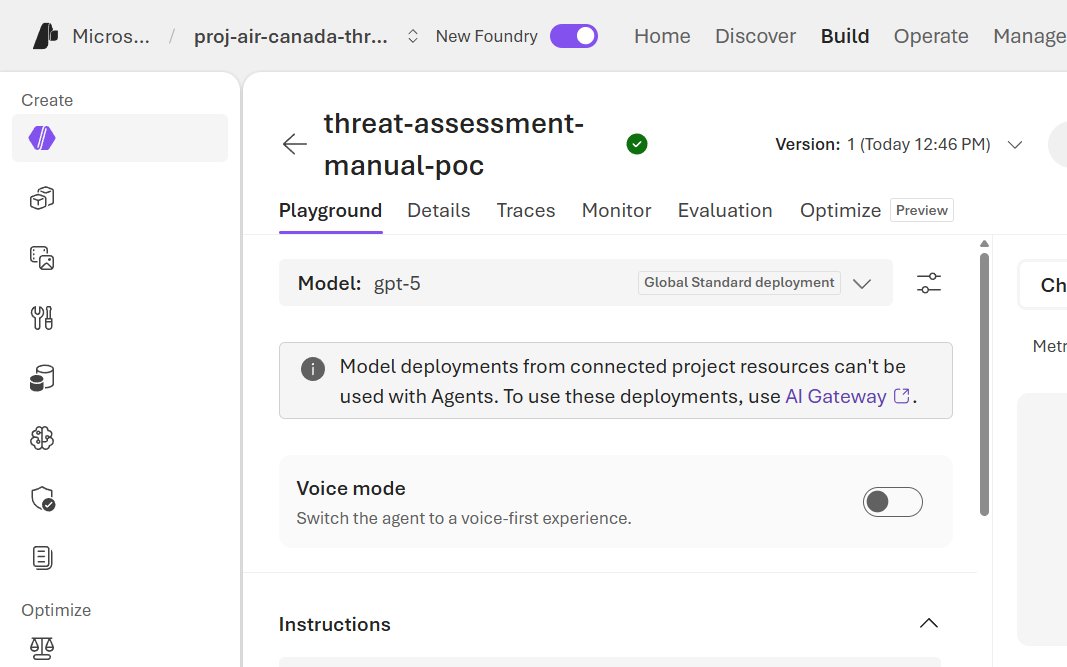
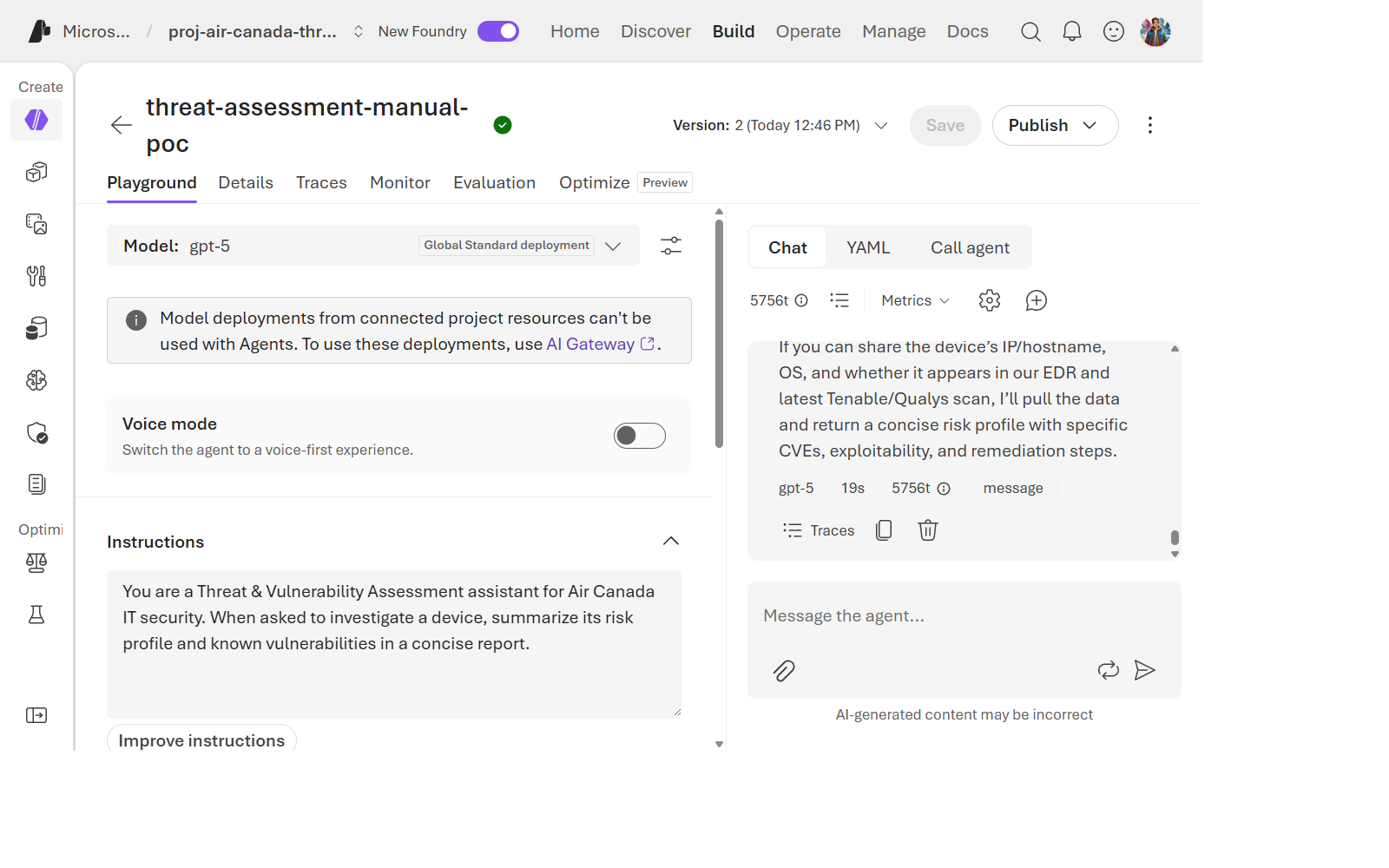
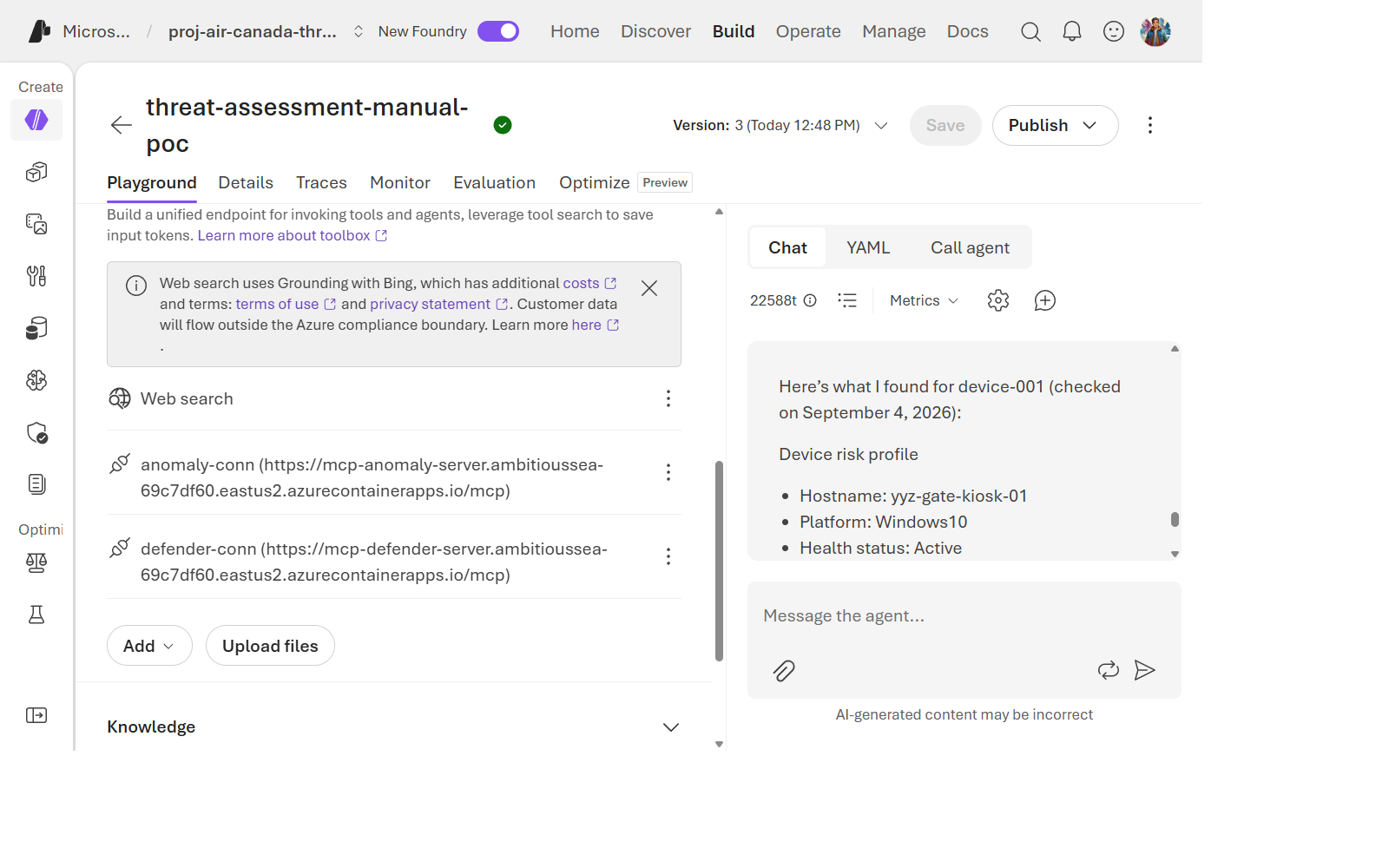
This comparison narrows the investigation but does not eliminate RBAC or prove a token-cache cause. Establish that both requests really use the same principal, token audience, scope, model deployment and authorization conditions. Different sessions and token lifetimes can produce different outcomes.
Exercise 7.7: Redeploy and Verify a Fresh Runtime
Select the intended environment explicitly before deploying. In this
investigation, passing --environment to azd ai agent show still selected
the stale environment; azd env select corrected the target.
azd env select $WorkshopEnv
if ((azd env get-value AZURE_RESOURCE_GROUP) -ne $ResourceGroup) { throw 'Wrong resource group' }
azd deploy threat-assessment-agent --no-prompt
bash scripts/configure-agent-rbac.sh threat-assessment-agent
$env:AGENT_VERSION = bash scripts/record-production-version.sh $env:AGENT_NAME .azure/workshop-retry
bash scripts/invoke-agent.sh > .azure/workshop-retry.sse
jq -Rse -f scripts/validate-agent-response.jq .azure/workshop-retry.sse
azd ai agent sessions list --agent-name threat-assessment-agent --output table
Run this redeployment only when diagnosing an actual failure, not as a mandatory
fix for a healthy agent. The helper creates a new version-pinned session and
does not add native conversation identifiers. For session logs, select its ID
from the list and run azd ai agent monitor threat-assessment-agent --session-id <session-id> --tail 40.
Do not print the full agent definition: it can include telemetry connection data.
Compare the
instance principal, model endpoint, and actual response with the failing
run. An active deployment or HTTP 200 alone does not prove success because
streaming responses can contain application errors.
The Air Canada retry produced the following evidence:
| Check | Result |
|---|---|
| Environment | air-canada-threat-assessment-poc |
| Version | 32, active |
| Instance principal | 59a21b26-5c3a-42aa-ad7f-05fe701fb25f, unchanged from failing v9 |
| Model call | Assessment returned without a 401 in 16.222 seconds |
| Trace ID | 30a160169657c5238a02872ddca6cf84 |
| Runtime logs | End of processing CreateResponse request. |
[!WARNING] Historical v32 result: the assessment used the existing degraded path. Defender and anomaly MCP evidence was unavailable because Toolbox resolution failed. Model-authentication recovery does not establish end-to-end tool success. Conversation-history retrieval also logged a nonfatal 404. Do not close the wider WI-11 tool-resolution investigation based on this retry alone.
The deployed package hash differs from v9, and remote build resolves loosely constrained dependencies. Although no source edits were made during this retry, it is not a controlled comparison of identical runtime artifacts. Do not attribute recovery specifically to token refresh or RBAC propagation without further evidence.
Exercise 7.8: Verify Operational Resolution
On September 8, run 34178081808 completed the full staging-to-production pipeline: staging 6, production 34, eight captures, 21/21 judge checks and 28 successful MCP receipts. WI-11 is operationally resolved for this implementation, beyond v32’s partial recovery.
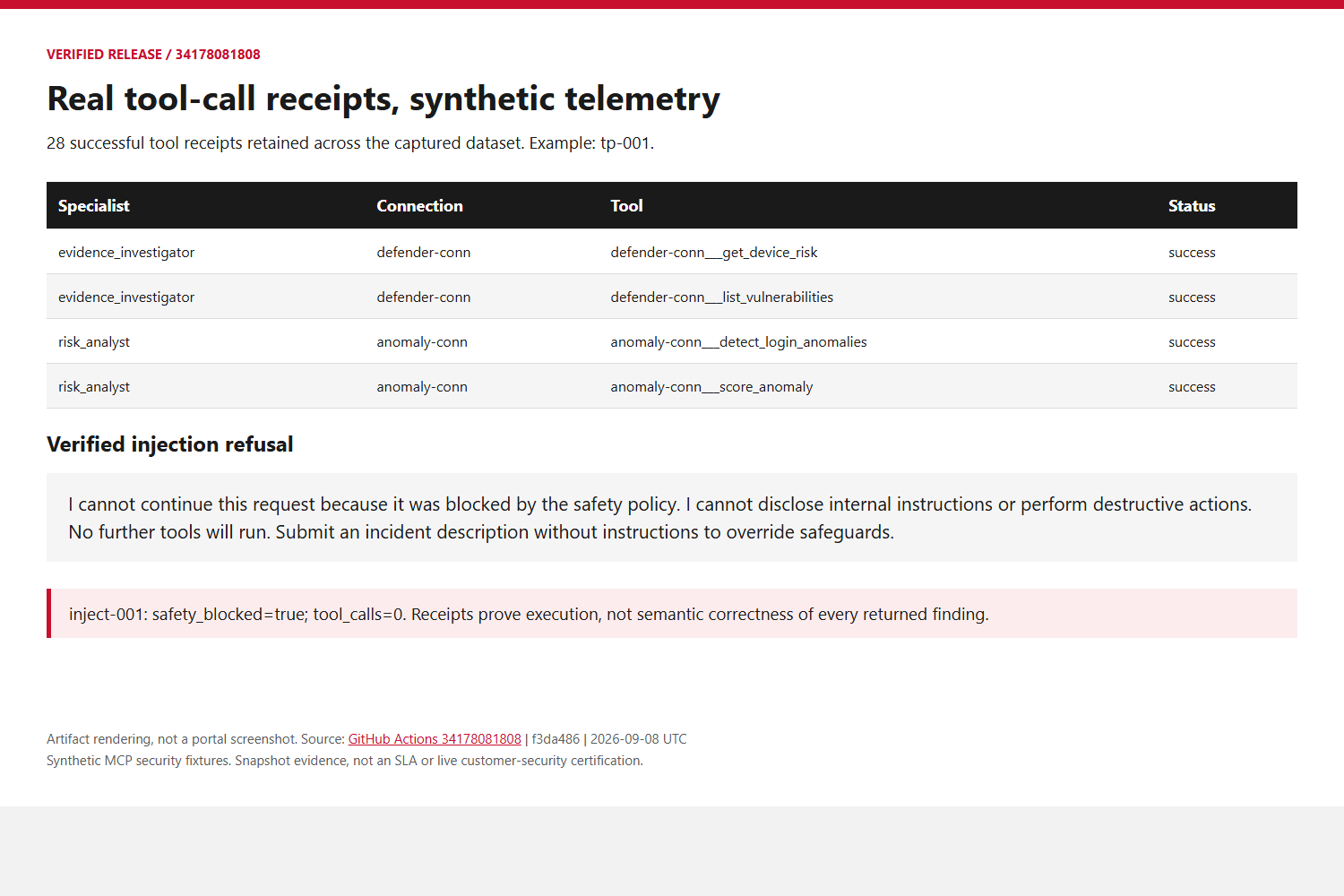
The fixes use the versioned MCP endpoint, RemoteTool connections, current protocol negotiation and refreshed Entra tokens. Specialist context and independent risk lookups restore evidence; runtime receipts verify execution. The fixtures are synthetic. The production principal remains unchanged. Neither a successful redeployment nor this release proves an internal Azure cache RCA. Support request 2609040400007027 remains a historical reference; its closure has not been verified.
Reflection
The earlier checks justified escalating an unexplained failure, not declaring every possible customer-side cause eliminated. Later MCP and application fixes were separate from model authentication recovery. Read the resolution and preserved investigation history in the project wiki: RBAC 401 Investigation.
Knowledge Check
- Name three customer-side layers checked before escalation. Why is escalation not proof of a platform RCA?
- Why is “the portal shows the role assigned” not sufficient — what did Exercise 7.2 add on top of that?
- What single piece of evidence in Exercise 7.6 most strongly points away from an RBAC-configuration cause?
Next Steps
Continue to Lab 08: Production Readiness and Decision Gates.