[!IMPORTANT] Every fixture, rulebook, and calculator output in this lab is synthetic and non-binding. Nothing here represents an actual Desjardins product, rate, or policy, and no regulator or insurer has reviewed or endorsed this material.
Overview
| Item | Value |
|---|---|
| Duration | 50 minutes |
| Level | Advanced |
| Prerequisites | Lab 12 completed against a tenant you can sign in to |
In Lab 07 you played the reviewer by calling ApprovalRepository.approve from a Python one-liner. This lab replaces that with the interface a reviewer actually uses.
Everything here runs on your workstation. The case store falls back to SQLite when no Cosmos endpoint is configured, so the full review loop works with no Azure data plane at all.
[!NOTE] The reviewer interface includes a manual EN/FR toggle in the header, matching the applicant-facing chat. Every label, message, and the fixed disclaimer render in whichever language the toggle selects, and the choice persists in the browser between visits.
Learning Objectives
By the end of this lab, you will be able to:
- Seed a local case queue from the checked-in fixtures
- Run the reviewer app against your real Entra registration
- Read a case whose calculation produced no amount
- Approve a case and read the audit entry the decision writes
- Explain why the reviewer identity in the audit trail is an object ID
Exercises
Exercise 13.1: Read the Case Store Fallback
Select-String -Path src/quote-preparation-agent/case_store.py -Pattern "def build_case_store" -Context 0,12
Expected result: the factory returns a Cosmos-backed store when COSMOS_ENDPOINT is set and a SQLite store otherwise, defaulting to :memory: unless CASE_STORE_DB_PATH names a file.
That fallback is what makes this lab possible offline. The reviewer app does not know which store it received.
Exercise 13.2 (Hands-on): Seed the Queue
scripts/seed_review_queue.py walks the same two store commands the agent’s composition node walks, create_draft followed by submit_for_review_with_calculation, against the real deterministic calculator and the checked-in fixtures. Every amount it writes comes from calculate_quote reading a fixture rulebook. None is a literal in the script.
python scripts/seed_review_queue.py --db-path .local/reviewer-cases.db
Expected result: five cases, each reported with its state and calculation status.
CASE-SYN-001: PENDING_REVIEW, calculation READY, 100000 cents
CASE-SYN-002: PENDING_REVIEW, calculation READY, 90000 cents
CASE-SYN-003: PENDING_REVIEW, calculation UNSUPPORTED, no amount
CASE-SYN-004: PENDING_REVIEW, calculation READY, 110000 cents
CASE-SYN-005: PENDING_REVIEW, calculation INCOMPLETE, no amount
Two of the five carry no amount. That is deliberate. A queue where every row is priced would not exercise the case the interface most needs to get right.
The script is safe to re-run: a case that already exists is skipped rather than duplicated.
Exercise 13.3 (Hands-on): Build and Run the Reviewer App
cd apps/reviewer-app/frontend
npm ci
npm test
npm run build
cd ../..
Expected result: the frontend tests pass and a bundle is written to dist. JSX is invisible to a syntax check, so npm run build is the only gate that catches a malformed component.
Start the backend with your real client ID from Lab 12:
$env:ENTRA_TENANT_ID = '<your-tenant-id>'
$env:REVIEWER_CLIENT_ID = '<reviewer-client-id>'
$env:ENVIRONMENT = 'local'
$env:COSMOS_ENDPOINT = ''
$env:CASE_STORE_DB_PATH = (Resolve-Path ../../.local/reviewer-cases.db).Path
python -m uvicorn app:create_app --factory --host 127.0.0.1 --port 8100
Expected result: Application startup complete. Setting COSMOS_ENDPOINT to an empty string forces the SQLite branch even if a Cosmos endpoint happens to be exported in your shell.
Invoke-WebRequest -Uri 'http://127.0.0.1:8100/api/config' -UseBasicParsing | Select-Object -ExpandProperty Content
Expected result: JSON carrying the tenant ID, client ID, the Review.Access scope, the Reviewer role, and an environment of local.
Exercise 13.4 (Hands-on): Sign In
Open http://localhost:8100 in a browser.
[!IMPORTANT] Use
localhost, not127.0.0.1. They are different origins, and onlyhttp://localhost:8100is a registered redirect URI.
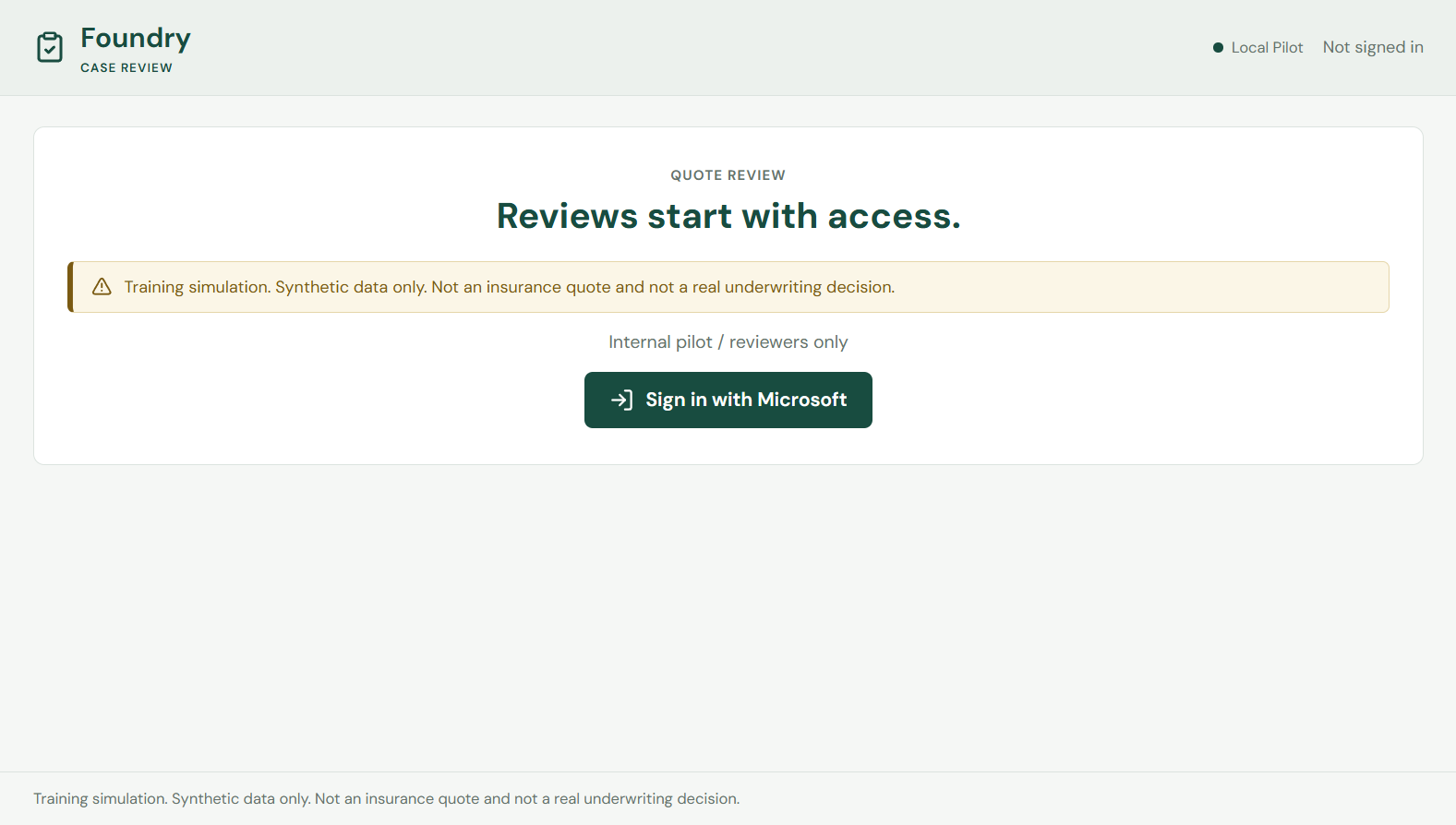
Expected result: an access gate with no case data behind it. Sign in with an account you added to the reviewer group in Lab 12.
If Entra rejects the sign-in, the message tells you which step of Lab 12 to revisit. A redirect URI mismatch is a registration problem. A message about the application not being assigned to a user is the appRoleAssignmentRequired flag doing its job.
Exercise 13.5: Read the Queue
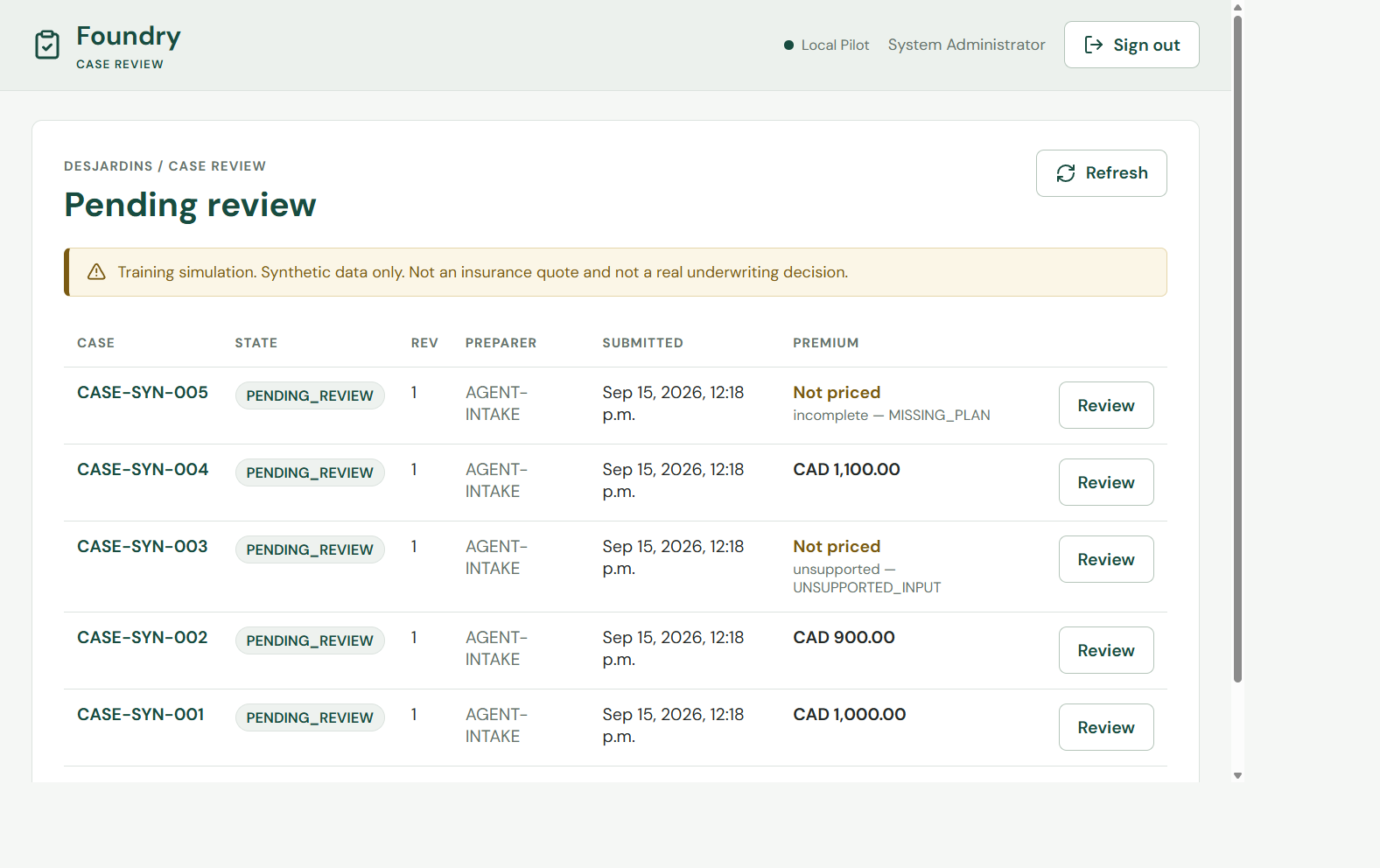
Expected result: five rows in PENDING_REVIEW. Three show a premium in CAD. Two show Not priced with the reason underneath, unsupported for CASE-SYN-003 and incomplete for CASE-SYN-005.
The preparer on every row is AGENT-INTAKE. No row has a reviewer yet.
Exercise 13.6 (Hands-on): Open a Priced Case
Select CASE-SYN-001.
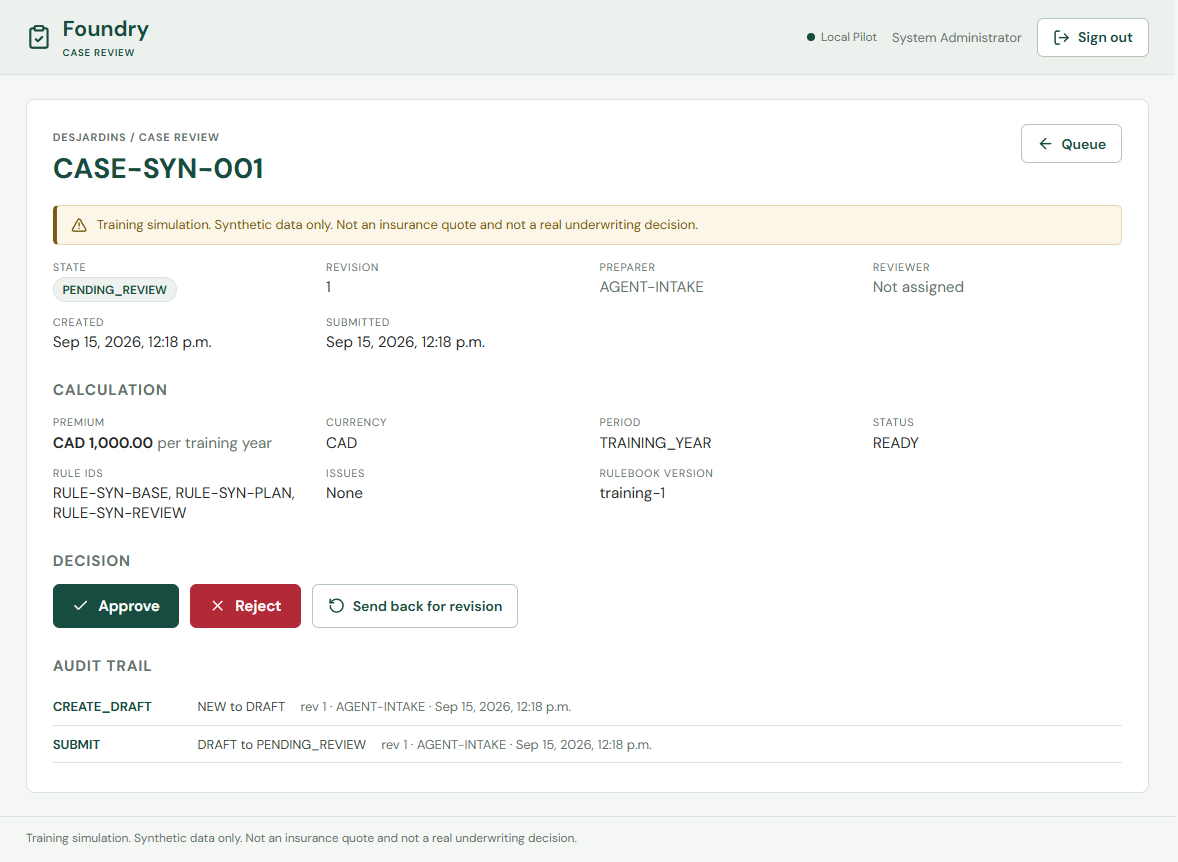
Expected result: the calculation panel shows the premium, the currency, the period, a status of READY, the rule IDs that produced the figure, and the rulebook version.
This is the amount the applicant never saw in Lab 11. Note what accompanies it: a reviewer is not shown a number in isolation but the rule IDs and rulebook version that generated it, which is what makes the figure checkable rather than merely readable.
The audit trail already has two entries, CREATE_DRAFT and SUBMIT, both attributed to AGENT-INTAKE.
Exercise 13.7 (Hands-on): Open an Unpriced Case
Return to the queue and select CASE-SYN-003.
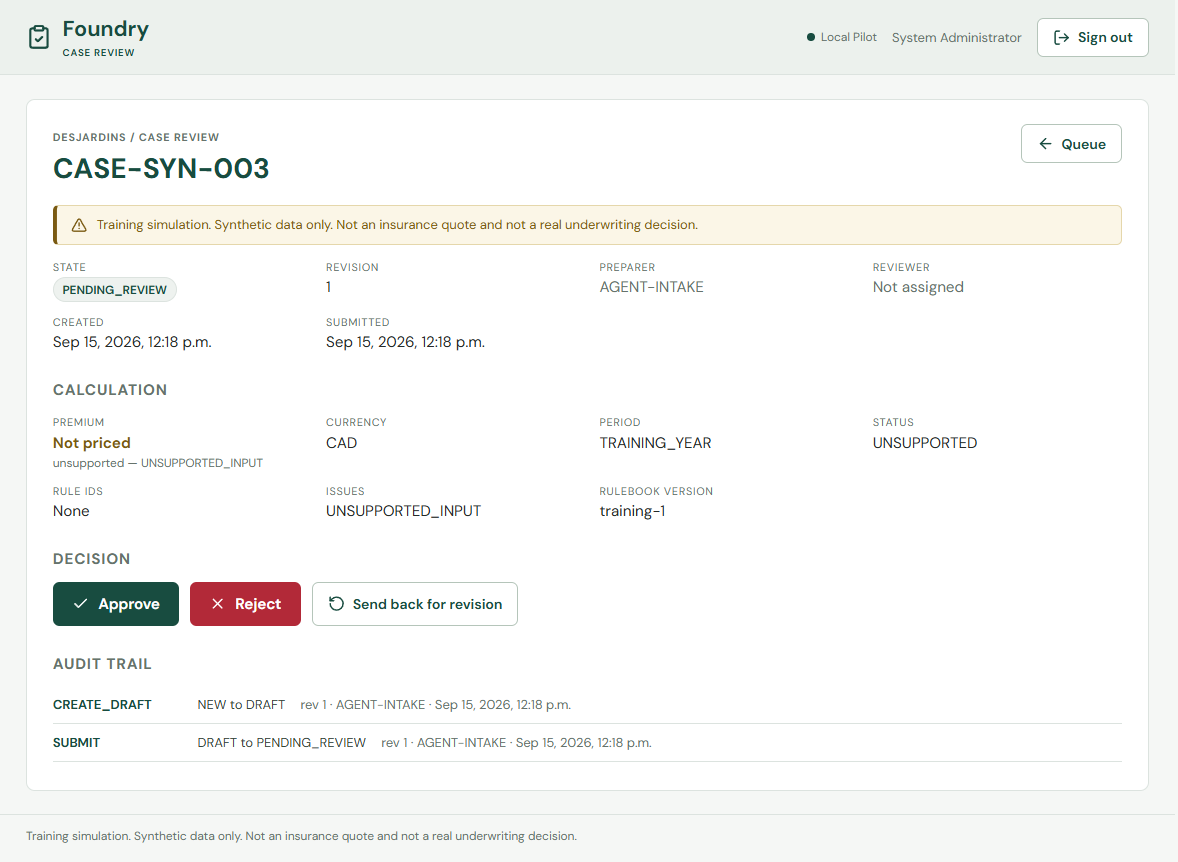
Expected result: the premium reads Not priced, the status is UNSUPPORTED, the rule IDs are None, and the issues field names UNSUPPORTED_INPUT.
The decision buttons remain enabled. A reviewer can still act on a case the calculator declined to price, which is the correct behaviour: an unpriceable case still needs a human outcome rather than being stranded in the queue.
Exercise 13.8 (Hands-on): Approve a Case
Return to CASE-SYN-001 and select Approve.
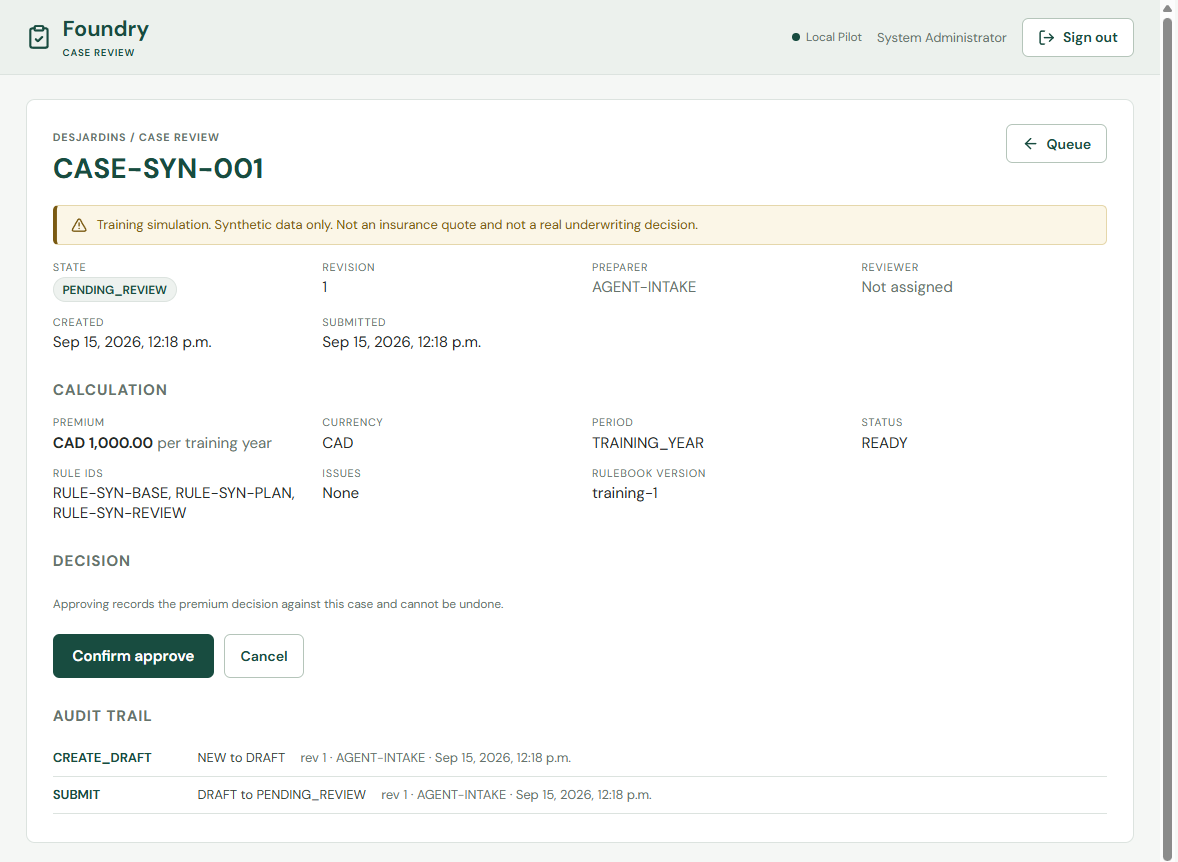
Expected result: a confirmation step rather than an immediate write. Approval records a premium decision and cannot be undone, so the interface asks once.
Reject and Send back for revision also confirm, but they additionally offer an optional reason code. Approve does not, because an approval is not a finding that needs explaining.
Confirm it.
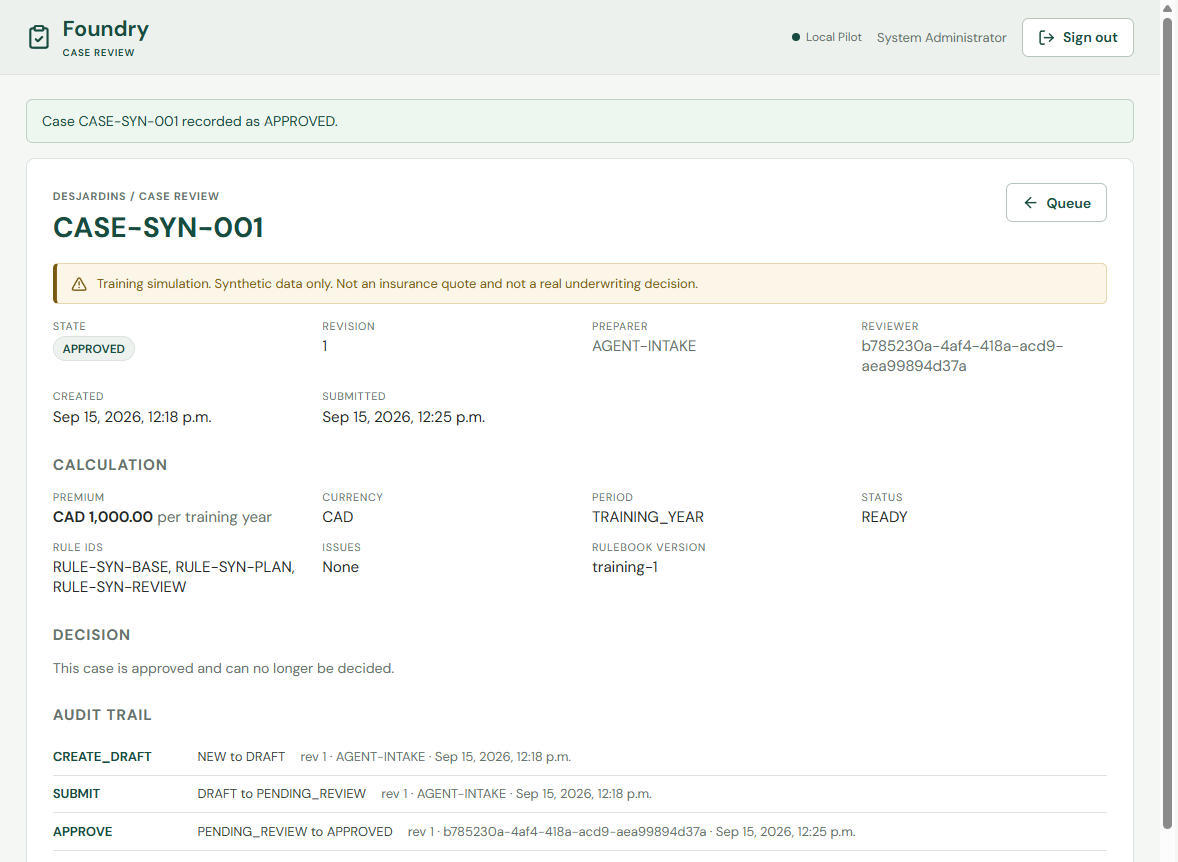
Expected result: the state becomes APPROVED, the reviewer field fills with an object ID, the decision buttons are replaced by a sentence explaining the case can no longer be decided, and a third audit entry appears recording the PENDING_REVIEW to APPROVED transition against your identity.
Exercise 13.9: Read the Audit Trail
Compare the three entries. The first two name AGENT-INTAKE. The third names a GUID.
That GUID is your Entra object ID, taken from the verified token’s oid claim rather than from anything the browser sent. A display name can change and an email address can be reassigned, but an object ID is stable for the life of the account, which is the property an audit record needs.
The separation you enforced in Lab 03 is now visible end to end: the identity that prepared the case and the identity that decided it are different, and both are recorded.
Check the server log in your uvicorn terminal:
reviewer_decision command=approve case=CASE-SYN-001 revision=1 reason=None
Expected result: a structured decision line accompanying the HTTP request log. The decision is recorded in the case store and in the application log.
Exercise 13.10: Clean Up
# In the terminal running uvicorn
Ctrl+C
Remove-Item .local/reviewer-cases.db -Force
The .local/ directory is in .gitignore, so the seeded database is never committed. Re-run Exercise 13.2 whenever you want a fresh queue.
Validation Checklist
- Five cases were seeded, two of them without an amount
npm testandnpm run buildsucceed inapps/reviewer-app/frontend/api/configreports theReviewerrole and an environment oflocal- You signed in through
http://localhost:8100and reached the queue - CASE-SYN-001 shows a premium, rule IDs, and a rulebook version
- CASE-SYN-003 shows
Not pricedwith its issue named - Approving CASE-SYN-001 wrote a third audit entry carrying your object ID
Knowledge Check
- Why does the reviewer app work with no Cosmos endpoint configured?
- Why does the audit trail store an object ID instead of a display name?
- Why are the decision buttons enabled on a case the calculator could not price?
- The applicant saw no amount in Lab 11 and you saw one here. Where in the pipeline does that divergence originate?
- Why does approval offer no reason code when reject and revision both do?
Next Steps
Continue to Lab 14: Pilot Operations.